
Ansible 自动化运维工具扩展资料
1. 自动化运维基础
1.1 运维工作与发展
1.1.1 运维岗位的工作内容
运维的核心职责是保障系统及服务的稳定性、可用性,使业务持续为用户提供服务。全年 7×24 小时是服务保障目标,实际还需定义可用性指标、维护窗口和故障恢复目标。

工作还包括:
- 提升效率:通过工具、自动化和平台提高研发生命周期效率。
- 控制成本:优化架构、资源和技术方案,在服务目标与成本间取得平衡。
- 发布管理:让发版可控、可验证、可回退。
- 变更管理:记录变更内容、人员、时间和结果。
- 备份恢复:定期备份重要数据并验证恢复能力。
- 灾难演练:演练故障预案,确认可操作性。
- 系统分析:采集日志与指标,识别风险、定位问题并准备预案。
- 技术选型:根据业务规模、团队能力和成本选择产品与架构。

项目生命周期中,运维通常参与四个阶段:
| 阶段 | 运维工作 |
|---|---|
| 首次上线 | 组建平台架构,部署基础环境和业务服务。 |
| 日常维护 | 保障稳定运行,支持迭代升级与故障处理。 |
| 性能效率优化 | 分析瓶颈,提升性能、容量与资源利用率。 |
| 项目下线 | 备份归档数据,确认依赖与保留期限,再释放资源。 |
1.1.2 职业发展
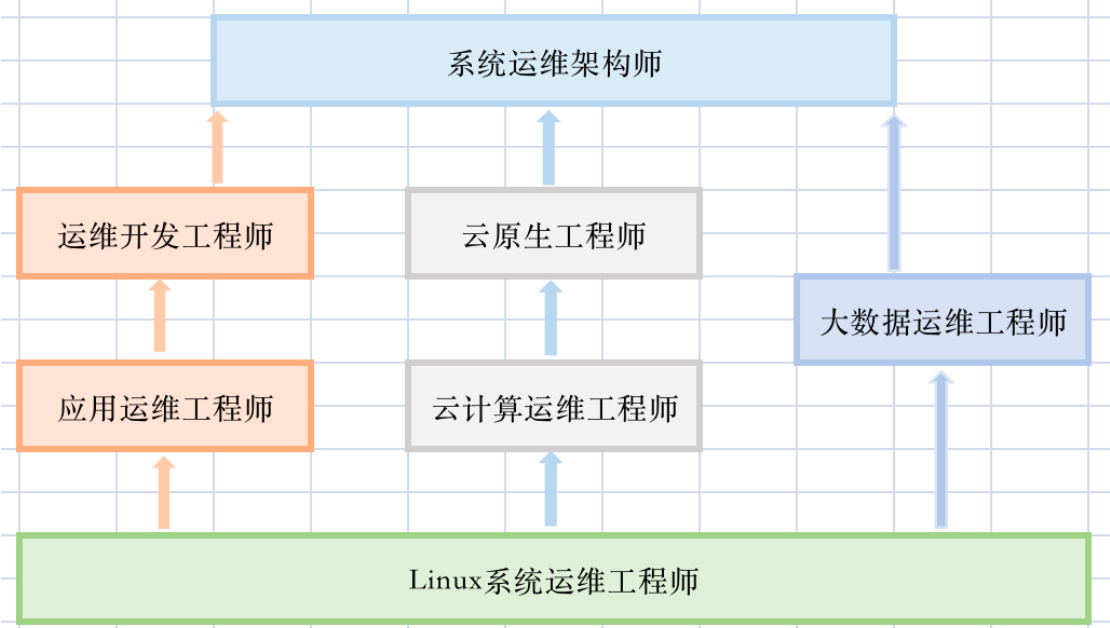
运维可向应用运维、开发运维、云平台、云计算、大数据、系统架构等方向发展。路线随组织分工而异,不是必须逐级经过的职称序列。

1.1.3 DevOps 与 SRE
DevOps 强调开发和运维协作,通过工具与流程缩短交付反馈周期;SRE 用软件工程方法管理可靠性,围绕服务目标、自动化和持续改进减少重复劳动。SRE 是落实部分 DevOps 思路的一种实践方式,两者不是互斥岗位。

自动化的目标包括自助交付和运营,让研发能够借助平台、工具及规范完成常规操作,运维通过代码与工程能力让服务保持可控、稳定和持续运行。
1.1.4 项目生命周期
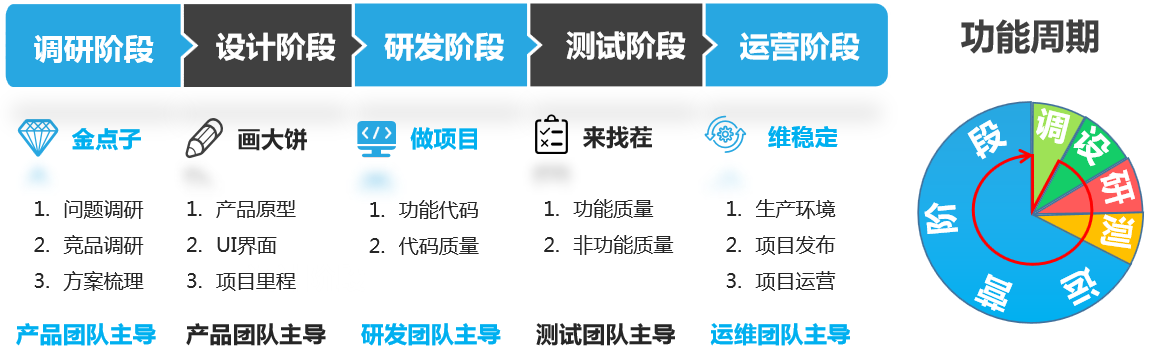
产品从无到有,通常经历调研、设计、研发、测试、运营。各阶段由相关团队协作,并通过反馈推进后续迭代。
1.1.5 项目环境
| 环境 | 主要人员 | 常见平台 | 特点 | 工作内容 | 阶段标准 |
|---|---|---|---|---|---|
| 个人开发 | 开发人员 | 个人工作站 | 可定制、与生产有差异 | 开发子模块 | 子模块完成。 |
| 公司开发 | 开发团队 | 内部服务器 | 统一的开发基线 | 模块、项目联调 | 项目阶段可运行。 |
| 测试 | 测试及相关研发 | 隔离的测试平台 | 可重复的测试环境 | 功能、性能及其他非功能测试 | 达到阶段测试准入条件。 |
| 预发布 | 运维、测试、研发 | 接近生产的隔离环境 | 尽量与生产一致 | 发布验证、专项测试 | 达到发布条件。 |
| 灰度 | 发布及业务团队 | 部分生产实例或流量 | 有限范围实际用户验证 | 分批发布与观察 | 达到扩大范围条件。 |
| 生产 | 运维及业务团队 | 生产平台 | 受控的标准运行环境 | 正式运营 | 满足约定服务目标。 |
“预发布”不意味着必须与正式生产共用服务器;“发布成功”需要业务验证及指标观察,不能只看进程启动。
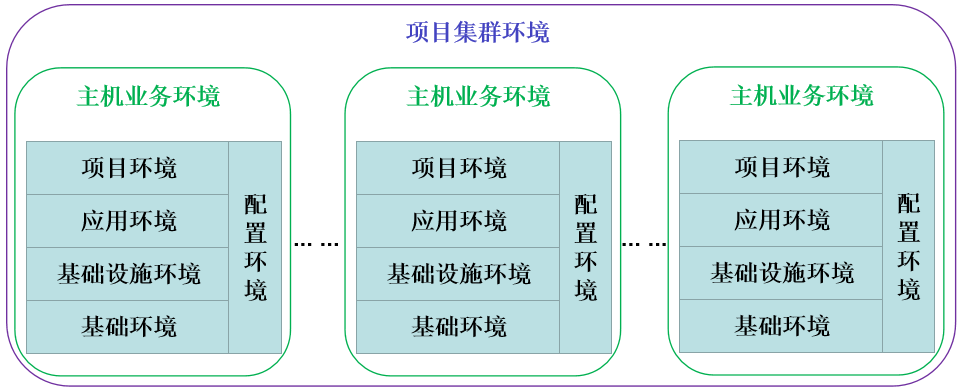
一个主机业务环境又包含基础操作系统、设备与网络、应用、项目和配置等层次,环境标准应按产品需求及实际生产约束制定。
1.1.6 程序发布流程
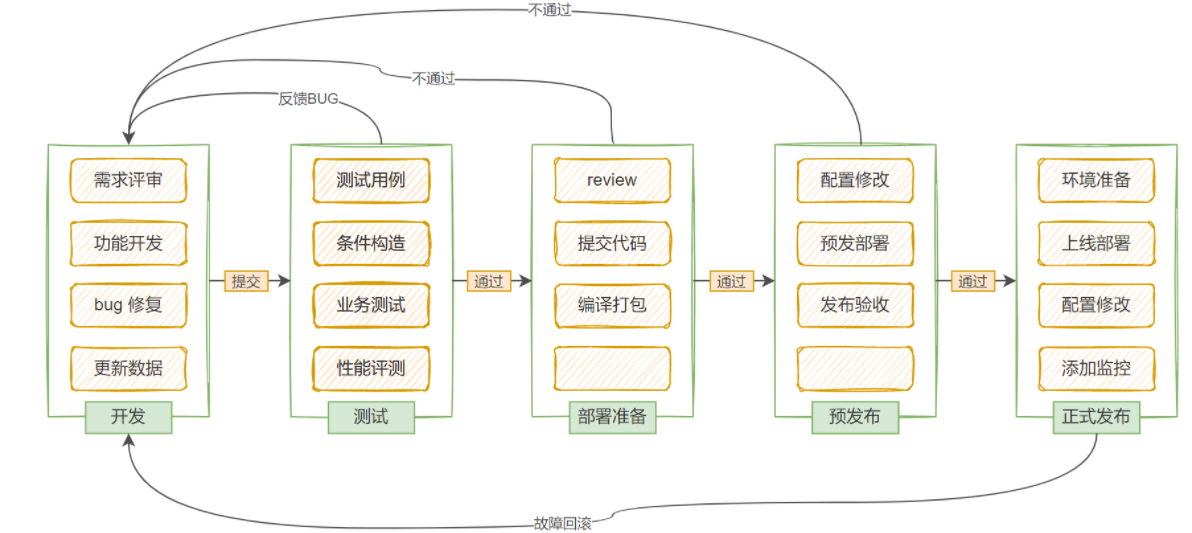
发布前确认目标分支已达到测试和功能准入标准,已知问题已处理或有明确接受方案、备份与回退计划。安排发布时间时避开业务高峰,并考虑值守能力和业务窗口。
一次分批发布可以按以下顺序进行:
- 从调度器摘除一批主机,等待请求排空。
- 根据部署方式停止需更新的服务。
- 部署新版本及配套配置。
- 启动并检查服务。
- 验证业务、依赖和指标。
- 将验证通过的主机接回调度器。
- 再次观察后继续下一批,异常则停止推进并按预案恢复。
灰度和蓝绿可以降低变更影响范围,但都需要流量控制、容量和数据兼容设计,不等于只把版本分批复制。
1.2 自动化运维方式与工具
1.2.1 管理方式

| 方式 | 形成过程 |
|---|---|
| 手工 | 先实现功能,再规范操作和流程。 |
| 自动化 | 精简流程,编写脚本,再通过工具自动执行。 |
| 封装 | 封装基础环境与应用,再编排任务。 |
| 智能化 | 结合历史数据、规则和模型辅助分析与执行。 |
企业可能混合使用多种方式;规模与自动化成熟度并不是严格对应关系。“自动化加封装”与“封装加自动化”强调不同的基础能力和投入顺序,应按业务需求选择。
1.2.2 工具特点
脚本能完成自动化,但复杂流程、环境差异、交接和长期维护会增加成本。配置管理工具将资源、状态、任务和环境差异纳入统一管理;它们仍需要学习模型、语法和使用边界,专用文件多了也需要组织和维护。

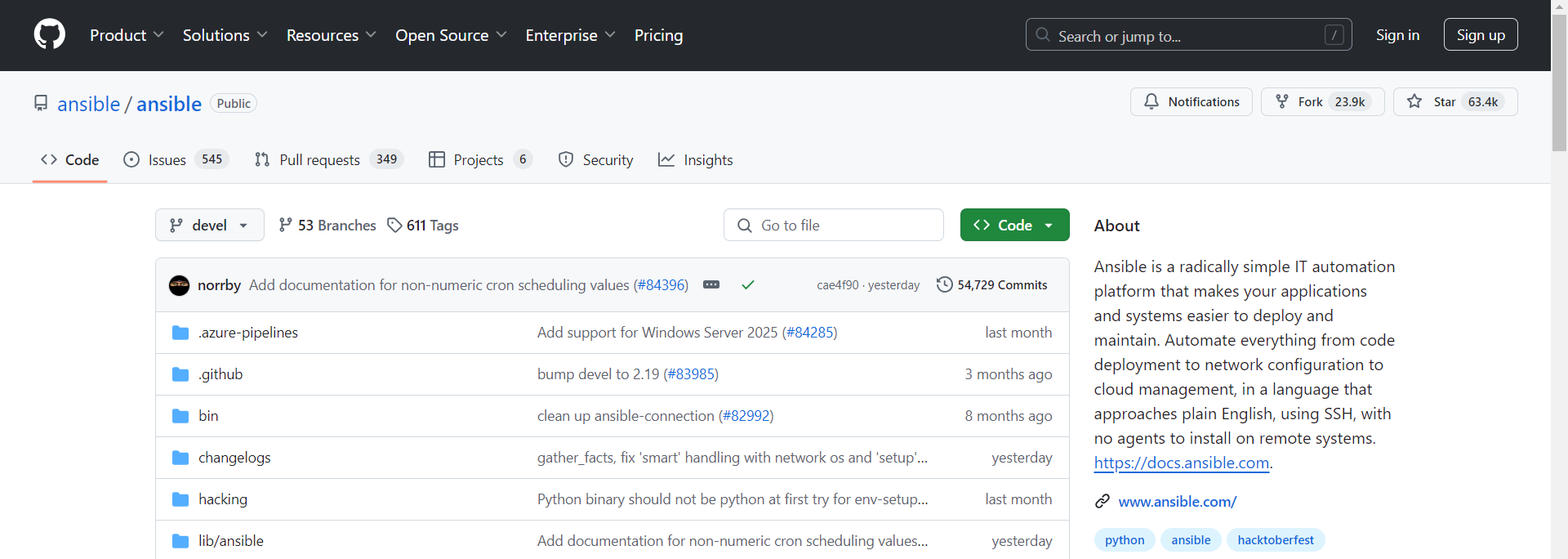
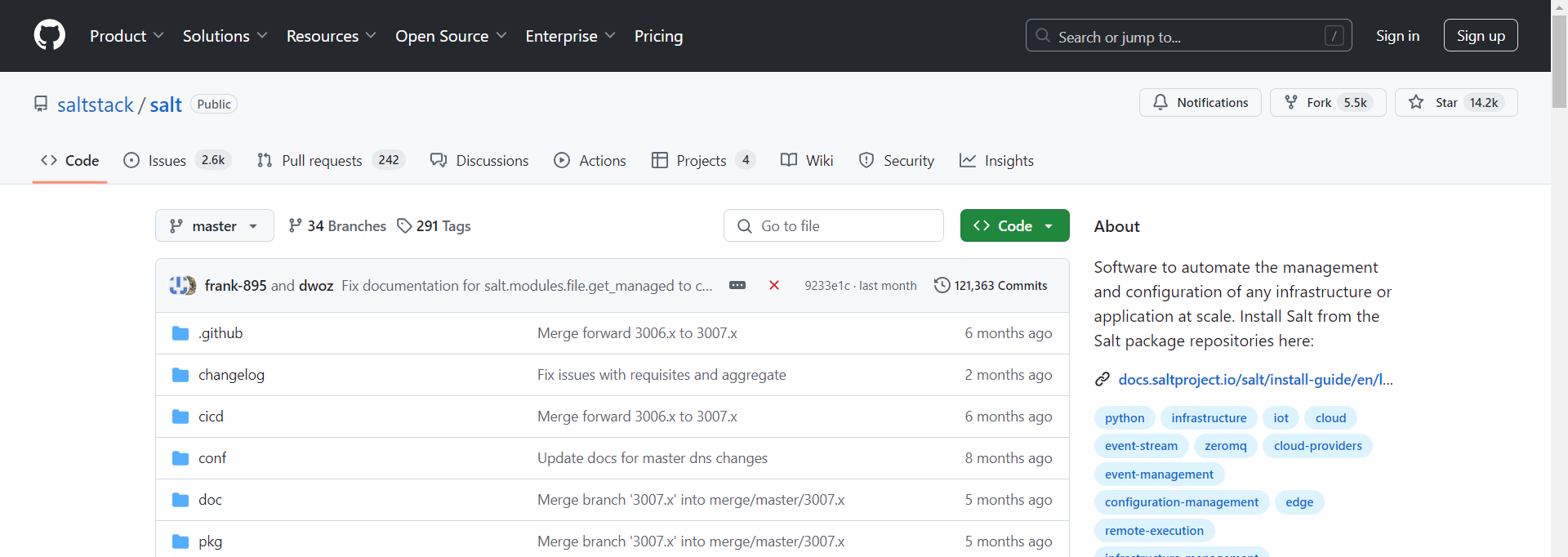
以下为课件记录的 GitHub 历史数据,不能当作当前热度:
| 工具 | 2021-12-23 Watch | Star | Fork | 贡献者 | 主要语言 |
|---|---|---|---|---|---|
| Ansible | 1990 | 51083 | 21375 | 5292 | Python |
| SaltStack | 563 | 12091 | 5214 | 2334 | Python |
| Puppet | 483 | 6411 | 2217 | 565 | Ruby |
| Chef | 386 | 6769 | 2552 | 629 | Ruby |
| Fabric | 467 | 13173 | 1853 | 14 | Python |
| 工具 | 2025-05-26 Watch | Star | Fork | 贡献者 | 主要语言 |
|---|---|---|---|---|---|
| Ansible | 1895 | 65158 | 24027 | 5561 | Python |
| SaltStack | 527 | 14529 | 5525 | 2450 | Python |
| Puppet | 462 | 7595 | 2202 | 589 | Ruby |
| Chef | 363 | 7781 | 2519 | 789 | Ruby |
| Fabric | 456 | 15117 | 1945 | 15 | Python |
2. Ansible 架构、安装与认证
2.1 Agentless 架构
Ansible 常规 Linux 管理不要求受管节点常驻专用 Agent,通常复用 SSH。执行普通 Python 模块时,控制端会准备任务、经连接插件访问目标、传送或通过 pipelining 提供模块、执行并收集结果,最后尽力清理临时文件。
前置依赖按实际连接和模块决定:
- 控制端与普通 Linux Python 模块所需的目标 Python 必须满足所用 ansible-core 支持矩阵,现代版本不能继续套用 Python 2 的通用要求。
- SSH 用户、认证、权限、主机身份校验和目标监听端口须就绪;端口可以不是 22。
raw、script等特定方式可用于没有目标 Python 的场景。- Windows、网络设备和 API 管理也可使用其他连接协议,不是所有目标都仅靠 OpenSSH。
无专用常驻 Agent 不表示零资源开销,任务运行仍消耗资源,SSH 服务也属于常驻服务。中断、不可达、异步任务或显式保留文件等情况下,不能保证“没有任何临时残留”。
与 Puppet、Chef、Salt 等工具比较,应区分其实际部署模式:它们并非全部只能定时拉取,也有实时事件、远程执行、独立或 SSH 模式。Agentless 通常降低初始部署负担,但大规模并发受连接、控制端能力和任务类型影响,不能按固定“超过一千台就低效”划线。
2.2 工作特性与组件
- Python 实现为主,插件化扩展连接、清单、回调和模块等功能。
- 常见依赖包括 PyYAML、Jinja2,连接可使用 OpenSSH 或特定插件;Paramiko 不是每种连接都必须走的固定环节。
- YAML Playbook 描述编排,Role 组织任务、变量、模板、文件与 Handlers。
- 模块可以用合适语言实现,但必须满足 Ansible 模块的调用、参数和结果协议,不能理解为任意程序直接可当模块。
- 幂等性取决于模块和任务实现,
shell、command、script不会天然自动识别一切目标状态。 - SSH 传输加密与主机信任、账号授权是不同问题;Agentless 不意味着不需要身份校验。
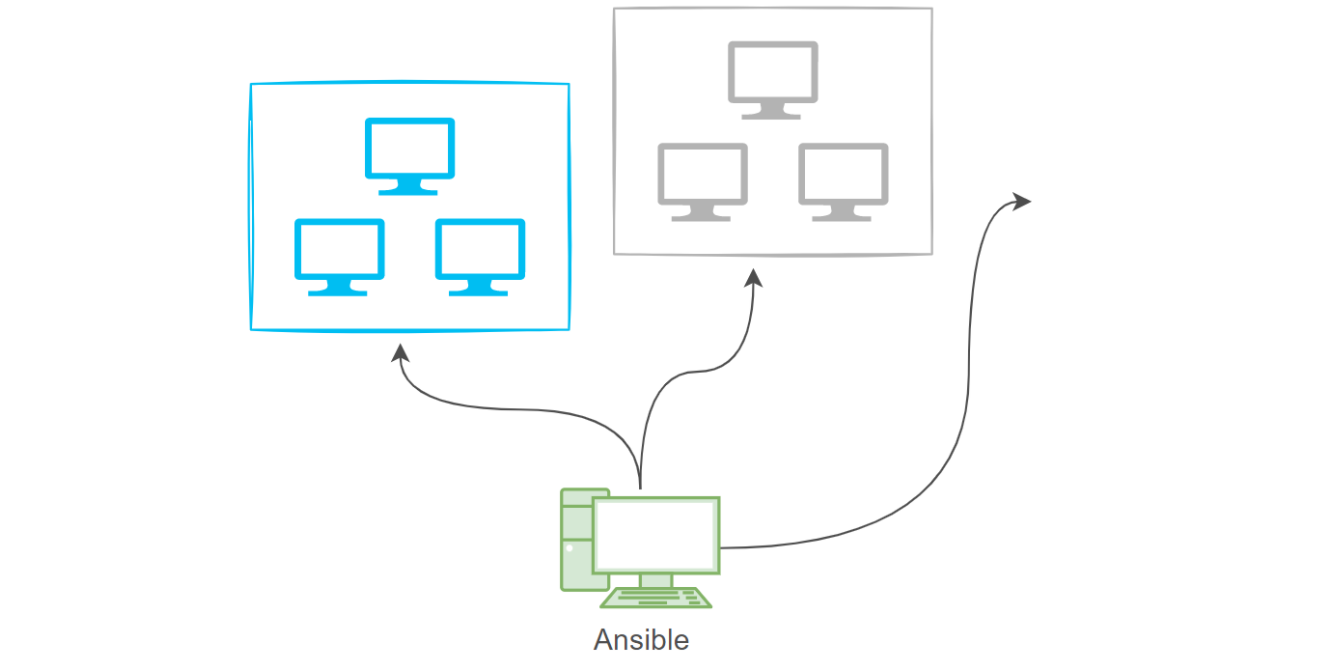
控制端处理来自 CLI、Playbook 或外部平台的请求,读取清单、变量和配置,经连接及动作插件调用模块并展示结果。外部 API 一般由自动化平台提供;安装 CLI 本身不会自动开放 Web API。
Ad-Hoc 适合临时和简单操作,Playbook 更适合可重复的复杂流程;选择不只由企业大小决定。可用于云资源、设备、应用、配置、持续交付和安全管理。
2.3 其他安装方式
2.3.1 Ubuntu 本地 DEB 与依赖修复
PPA 网络慢时,课件记录:
apt install ansible
获取:14 https://ppa.launchpadcontent.net/ansible/ansible/ubuntu noble/main amd64 ansible all 11.11.0-1ppa~noble [19.5 MB]
25% [14 ansible 220 kB/19.5 MB 1%] 14.9 kB/s 21分 33秒
26% [14 ansible 497 kB/19.5 MB 3%] 10.9 kB/s 29分 5秒
可从可信源获取与发行版匹配的软件包并核验完整性,再传到目标主机;这不会自动解决依赖下载问题。

ls
ansible_11.11.0-1ppa~noble_all.deb
直接使用 dpkg 的历史过程:
dpkg -i ./ansible_11.11.0-1ppa~noble_all.deb
dpkg: 依赖关系问题使得 ansible 的配置工作不能继续:
 ansible 依赖于 ansible-core;然而:
  未安装软件包 ansible-core。
dpkg: 处理软件包 ansible (--install)时出错:
 依赖关系问题 - 仍未被配置
课件再次执行:
apt install ./ansible_11.11.0-1ppa~noble_all.deb
您也许需要运行“apt --fix-broken install”来修正上面的错误。
ansible : 依赖: ansible-core 但是它还没有被安装
          推荐: python3-jmespath 但是它还没有被安装
          推荐: python3-winrm 但是它还没有被安装
E: 有未能满足的依赖关系。
按实际解析方案修复,再核对版本:
apt --fix-broken install
ansible --version
通常可以一开始就使用 apt install ./包名.deb 让 APT 处理依赖;需保留匹配的可用源。--fix-broken 可能提出安装或移除方案,不能无条件假定只会安装期望的包。
2.3.2 Rocky 软件包安装
dnf install epel-release
dnf install ansible
rpm -q ansible
ansible --version
是否需要 EPEL、仓库提供 ansible 还是 ansible-core,取决于发行版大版本与启用仓库,不能说官方安装仅支持 Ubuntu 与 pip。
课件历史输出实际上来自 EL9/Python 3.9 环境,虽然提示符写 rocky10-12,不能据此当成 Rocky 10 的安装结果:
ansible-7.7.0-1.el9.noarch
ansible [core 2.14.17]
  config file = /etc/ansible/ansible.cfg
  configured module search path = ['/root/.ansible/plugins/modules', '/usr/share/ansible/plugins/modules']
  ansible python module location = /usr/lib/python3.9/site-packages/ansible
  ansible collection location = /root/.ansible/collections:/usr/share/ansible/collections
  executable location = /usr/bin/ansible
  python version = 3.9.18 (main, Jan 24 2024, 00:00:00) [GCC 11.4.1 20231218 (Red Hat 11.4.1-3)] (/usr/bin/python3)
  jinja version = 3.1.2
  libyaml = True
2.3.3 Python 虚拟环境安装
Ubuntu 等发行版可能通过 PEP 668 保护系统 Python 的 externally managed 环境,这不是“root 用户不能使用 pip”的限制。使用 venv 可以隔离依赖,不覆盖系统管理的 Python 软件包。
apt install python3 python3-venv python3-pip -y
mkdir my_project
cd my_project
python3 -m venv venv
source venv/bin/activate
pip3 install -i https://pypi.tuna.tsinghua.edu.cn/simple ansible
ansible --version
原实验:
ansible [core 2.18.6]
  config file = None
  configured module search path = ['/root/.ansible/plugins/modules', '/usr/share/ansible/plugins/modules']
  ansible python module location = /root/my_project/venv/lib/python3.12/site-packages/ansible
  ansible collection location = /root/.ansible/collections:/usr/share/ansible/collections
  executable location = /root/my_project/venv/bin/ansible
  python version = 3.12.3 (main, Nov 6 2024, 18:32:19) [GCC 13.2.0] (/root/my_project/venv/bin/python3)
  jinja version = 3.1.4
  libyaml = True
(venv) 提示说明已激活虚拟环境,config file = None 表示未加载配置文件,不等于安装失败。退出:
deactivate
参考:安装指南中文镜像。版本支持和依赖仍须按所选发行版本核对。
2.3.4 Git 源码开发环境
源码运行适合开发或特定调试需求,不只是改一改版本号就能替代受支持安装。先准备兼容的 Python、隔离环境及该分支的开发依赖。
mkdir -p /data/codes
cd /data/codes
git clone https://github.com/ansible/ansible.git
cd ansible
source ./hacking/env-setup
ls -l bin/
python3 bin/ansible --version
源码入口改用官方地址;代理或镜像可按可信的实际网络环境配置。hacking/env-setup 的支持方式随分支变化,应按该版本开发文档操作,不假定自动安装全部依赖。
原课件 bin/ 内容包括以下符号链接,路径和链接形式随版本可能变化:
ansible           -> ../lib/ansible/cli/adhoc.py
ansible-config    -> ../lib/ansible/cli/config.py
ansible-console   -> ../lib/ansible/cli/console.py
ansible-doc       -> ../lib/ansible/cli/doc.py
ansible-galaxy    -> ../lib/ansible/cli/galaxy.py
ansible-inventory -> ../lib/ansible/cli/inventory.py
ansible-playbook  -> ../lib/ansible/cli/playbook.py
ansible-pull      -> ../lib/ansible/cli/pull.py
ansible-test      -> ../test/lib/ansible_test/_util/target/cli/ansible_test_cli_stub.py
ansible-vault     -> ../lib/ansible/cli/vault.py
原课件版本检查的关键输出:
config file = None
configured module search path = ['/root/.ansible/plugins/modules', '/usr/share/ansible/plugins/modules']
ansible python module location = /data/codes/ansible/lib/ansible
ansible collection location = /root/.ansible/collections:/usr/share/ansible/collections
executable location = bin/ansible
python version = 3.12.3 (main, Nov 6 2024, 18:32:19) [GCC 13.2.0] (/usr/bin/python3)
jinja version = 3.1.2
libyaml = True
2.4 认证管理
2.4.1 手工输入连接密码
ansible -h | grep '\-k,'
ansible 10.0.0.13 -a 'ls /root' -k
ansible ansible_server -a 'ls /root' -k
-k, --ask-pass        ask for connection password
SSH password:
10.0.0.13 | CHANGED | rc=0 >>
ansible.cfg
snap
目标参数可以是清单中的主机名、IP 或组;仍要匹配已加载的清单。-k 请求 SSH 连接密码,-K 则请求提权密码,两者不同。
known_hosts 用来核验服务器身份,用户密码或私钥用来认证登录用户;清单定义目标和连接变量。 不能把 Ansible 认证本质归结为 known_hosts,或者认为清单只是中间人。
2.4.2 连接属性与 local 连接
课件在主机条目加入 ansible_connection=local 后,即使没有 SSH 凭据也能执行任务,因为它在控制节点本地运行,根本没有连接远程 IP。不能把这当作绕过 SSH 认证的远程连接实验。
备份清单后可在专用实验清单中设置:
[ansible_server]
10.0.0.13 ansible_connection=local ansible_python_interpreter=/usr/bin/python3
解释器路径须在控制端实际存在。local 模式中密码变量无助于远程认证,不需要再加入明文 ansible_ssh_pass。
cp -a /etc/ansible/hosts /etc/ansible/hosts.bak
ansible 10.0.0.13 -m ansible.builtin.ping
ansible ansible_server -m ansible.builtin.ping
10.0.0.13 | SUCCESS => {
    "changed": false,
    "ping": "pong"
}
原课件为了“清除认证”删除整个 .ssh,已去掉该做法;其中还可能有私钥、authorized_keys 和其他主机信任记录。无需删除它们来说明 local 与 SSH 的区别。
2.4.3 SSH 公钥认证
切回 SSH 清单;只在确认备份对应目标状态时还原:
cp /etc/ansible/hosts.bak /etc/ansible/hosts
[ansible_server]
10.0.0.13 ansible_python_interpreter=/usr/bin/python3
生成一对尚不存在的专用密钥,向授权的实验账号安装公钥:
ssh-keygen -t ed25519 -f ~/.ssh/id_ed25519_ansible
ssh-copy-id -i ~/.ssh/id_ed25519_ansible.pub root@10.0.0.13
ansible 10.0.0.13 -m ansible.builtin.ping --private-key ~/.ssh/id_ed25519_ansible
ansible ansible_server -m ansible.builtin.ping --private-key ~/.ssh/id_ed25519_ansible
原文使用 RSA,符合目标策略的 RSA 密钥同样可用;这里使用专用密钥,后续清单显式引用它。Root SSH 是否允许、账号是否需提权,取决于目标策略,不是 Ansible 自动授予。
2.5 目标主机匹配
2.5.1 匹配规则
| 形式 | 作用 |
|---|---|
all |
当前清单中所有主机。 |
*、10.0.0.* |
通配匹配,不是真正正则表达式。 |
web:mysql |
并集。 |
web:&mysql |
交集。 |
web:!storage |
从 web 中排除 storage。 |
~正则表达式 |
使用正则形式的主机模式,区别于 *。 |
--limit / -l |
在本次目标基础上进一步限制。 |
这些模式作用于已加载的清单;不会按网段自动扫描发现主机。含 *、&、! 的参数优先用单引号,避免 Shell 提前解释。
2.5.2 实验清单
原文表格与实际清单不一致。下面按其清单和后续 graph 输出统一:
| IP | 课堂主机名 | 所属组 | 用途 |
|---|---|---|---|
| 10.0.0.13 | ubuntu24-13.ansible.com | web、mysql | 控制端、受管端。 |
| 10.0.0.12 | rocky10-12.ansible.com | web、storage | 受管端;部分输出其实来自 Rocky 9。 |
| 10.0.0.16 | ubuntu24-16.ansible.com | mysql、storage | 受管端。 |
/etc/ansible/hosts 示例:
10.0.0.13

[web]
10.0.0.12
10.0.0.13

[mysql]
10.0.0.13
10.0.0.16

[storage]
10.0.0.12
10.0.0.16

[all:vars]
ansible_user=root
ansible_ssh_private_key_file=~/.ssh/id_ed25519_ansible
独立列出的 .13 又属于其他组,因此最终不在 ungrouped 中。同一个主机可属于多个组,但只代表同一清单主机对象。
按前一节已有密钥安装公钥,不重复生成或覆盖:
for i in 12 13 16; do
  ssh-copy-id -i ~/.ssh/id_ed25519_ansible.pub root@10.0.0.$i
done
ansible all -m ansible.builtin.ping
原文还提到配套 01-root_ssh_auth.sh,此 PDF 没有脚本正文,不能当作本目录已经附带。
原实验三台主机均返回:
10.0.0.13 | SUCCESS => {"changed": false, "ping": "pong"}
10.0.0.16 | SUCCESS => {"changed": false, "ping": "pong"}
10.0.0.12 | SUCCESS => {"changed": false, "ping": "pong"}
ping 是 Ansible 模块执行测试,不是 ICMP ping;普通 Linux 目标还检查相应连接与 Python 模块运行能力。
2.5.3 过滤与逻辑操作
ansible all -m ansible.builtin.ping
ansible '*' -m ansible.builtin.ping
ansible '10.0.0.*' -m ansible.builtin.ping
ansible web -m ansible.builtin.ping
ansible all -m ansible.builtin.ping -l 10.0.0.13
ansible 'web:mysql' -m ansible.builtin.ping
ansible 'web:10.0.0.16' -m ansible.builtin.ping
ansible 'web:&mysql' -m ansible.builtin.ping
ansible ungrouped -m ansible.builtin.ping
ansible 'web:!storage' -m ansible.builtin.ping
ansible 'all:!web' -m ansible.builtin.ping
ansible 'web:&mysql:!storage' -m ansible.builtin.ping
按上面的清单:
| 模式 | 匹配结果 |
|---|---|
all、*、10.0.0.* |
.12、.13、.16。 |
web |
.12、.13。 |
web:mysql、web:10.0.0.16 |
.12、.13、.16。 |
web:&mysql |
.13。 |
ungrouped |
空,原输出 [WARNING]: No hosts matched, nothing to do。 |
web:!storage |
.13。 |
all:!web |
.16。 |
web:&mysql:!storage |
.13。 |
原文写“web 和 mysql 共有”时使用 web:mysql:!storage,冒号实际上先求并集;本例恰好同样剩 .13,不能因为结果相同就把并集误当交集。原来的 :!web 已写成更清楚的 all:!web。
2.6 命令执行流程
配置文件通常按 ANSIBLE_CONFIG、当前目录、用户目录、系统目录等优先级查找;不是永远加载 /etc/ansible/ansible.cfg。不安全目录等还有额外规则,应以 ansible --version 的实际结果为准。
典型流程:
- 读取配置、清单和变量,选择主机模式。
- 加载动作、连接和模块等插件,默认 Ad-Hoc 模块通常为 command。
- 建立或复用连接,准备远端临时目录。
- 传送模块包装文件;启用 pipelining 等时流程可变化。
- 在目标端执行模块并收集标准输出、错误和返回状态。
- 尽力清理临时文件,由控制端回调展示结果。
~/.ansible/cp 主要保存 SSH 复用控制 socket,不是模块临时脚本目录;~/.ansible/tmp 等位置由配置决定。forks 限制并发工作进程,不能拿调试输出中出现几条 SSH 命令推断并发量。SSH ControlPersist 也可能在任务后继续保留连接。
执行原实验的调试入口:
ansible 10.0.0.12 -m ansible.builtin.command -a 'ls /root' -vvv
原记录的阶段与关键输出如下,保留其路径、模块和状态;重复的 OpenSSH 版本及协商行合并展示:
ansible [core 2.18.6]
  config file = /root/ansible.cfg
  ansible python module location = /usr/lib/python3/dist-packages/ansible
  executable location = /usr/bin/ansible
  python version = 3.12.3 (/usr/bin/python3)
  jinja version = 3.1.2
  libyaml = True
Using /root/ansible.cfg as config file
host_list declined parsing /etc/ansible/hosts as it did not pass its verify_file() method
script declined parsing /etc/ansible/hosts as it did not pass its verify_file() method
auto declined parsing /etc/ansible/hosts as it did not pass its verify_file() method
Parsed /etc/ansible/hosts inventory source with ini plugin
Skipping callback 'default', as we already have a stdout callback.
Skipping callback 'minimal', as we already have a stdout callback.
Skipping callback 'oneline', as we already have a stdout callback.
<10.0.0.12> ESTABLISH SSH CONNECTION FOR USER: None
SSH options: ControlMaster=auto ControlPersist=60s ConnectTimeout=10
ControlPath="/root/.ansible/cp/4121990a2e"
OpenSSH_9.6p1 Ubuntu-3ubuntu13.5, OpenSSL 3.0.13 30 Jan 2024
Connecting to 10.0.0.12 [10.0.0.12] port 22.
创建临时目录、传输、授权、执行与清理的原记录:
mkdir /root/.ansible/tmp/ansible-tmp-1733403659.621861-14045-101342830451514
Using module file /usr/lib/python3/dist-packages/ansible/modules/command.py
PUT /root/.ansible/tmp/ansible-local-14041b4k_0i9f/tmpf9amqhvy TO /root/.ansible/tmp/ansible-tmp-1733403659.621861-14045-101342830451514/AnsiballZ_command.py
SSH: EXEC sftp -b - ... '[10.0.0.12]'
chmod u+x /root/.ansible/tmp/ansible-tmp-1733403659.621861-14045-101342830451514/ /root/.ansible/tmp/ansible-tmp-1733403659.621861-14045-101342830451514/AnsiballZ_command.py
/usr/bin/python3 /root/.ansible/tmp/ansible-tmp-1733403659.621861-14045-101342830451514/AnsiballZ_command.py
rm -f -r /root/.ansible/tmp/ansible-tmp-1733403659.621861-14045-101342830451514/ > /dev/null 2>&1
Received exit status from master 0
模块结果:
{
  "changed": true,
  "stdout": "anaconda-ks.cfg",
  "stderr": "",
  "rc": 0,
  "cmd": ["ls", "/root"],
  "start": "2024-12-05 21:01:00.121814",
  "end": "2024-12-05 21:01:00.126763",
  "delta": "0:00:00.004949",
  "msg": "",
  "invocation": {
    "module_args": {
      "_raw_params": "ls /root",
      "_uses_shell": false,
      "expand_argument_vars": true,
      "stdin_add_newline": true,
      "strip_empty_ends": true,
      "argv": null,
      "chdir": null,
      "executable": null,
      "creates": null,
      "removes": null,
      "stdin": null
    }
  }
}
10.0.0.12 | CHANGED | rc=0 >>
anaconda-ks.cfg
输出中的 CHANGED 是 command 的默认变更报告,不代表 ls 真修改文件。调试日志里的 Broken pipe 若伴随复用会话正常结束及 rc=0,也不能仅按该字面判断任务失败。
3. 常用模块实践
本节优先使用 FQCN。ansible.posix、community.general 等 Collection 不是裸 ansible-core 的全部内置模块,需要准备与版本匹配的集合及目标依赖。
3.1 script:运行控制端脚本
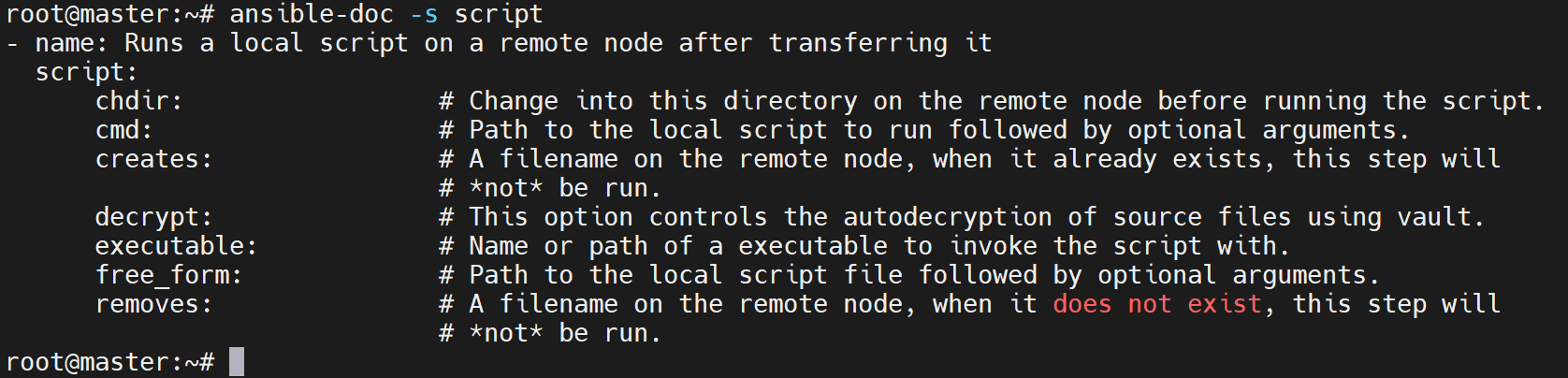
模块名是 script,不是 scripts。它把控制端脚本传到目标后运行,不是执行远端已有脚本的通用入口。
| 参数 | 作用 |
|---|---|
chdir |
执行前切换到目标目录。 |
creates |
指定目标存在时跳过。 |
removes |
指定目标不存在时跳过。 |
executable |
在目标端使用的脚本解释器,不是必须提供的所有脚本参数。 |
decrypt |
是否自动解密受 Vault 保护的源脚本。 |
调用通式:
ansible <目标> -m ansible.builtin.script -a '/控制端/脚本 参数 executable=/目标端/解释器'
远端已有脚本:使用 command/shell
使用 printf 创建,避免 /bin/sh 的 echo -e 差异:
ansible 10.0.0.16 -m ansible.builtin.shell -a 'printf "#!/bin/bash\necho \"\$1\"\n" > /tmp/test.sh'
ansible 10.0.0.16 -m ansible.builtin.command -a '/bin/bash /tmp/test.sh 0.15'
修正后预期输出 0.15。解释器读取脚本时不要求脚本本身有可执行位,但需要可读权限。
控制端脚本:使用 script
mkdir -p /data/ansible/scripts
cat > /data/ansible/scripts/test.sh <<'SCRIPT'
#!/bin/bash
printf '%s\n' "$1"
SCRIPT
ansible 10.0.0.16 -m ansible.builtin.script -a '/data/ansible/scripts/test.sh 0.15 executable=/bin/bash'
script 并不必然幂等,可借助 creates/removes 限制执行条件。
原课件误用及原始报错,保留用于理解根因:
ansible 10.0.0.16 -m script -a "/tmp/test.sh 0.15"
Could not find or access '/tmp/test.sh' on the Ansible Controller.
If you are using a module and expect the file to exist on the remote, see the remote_src option
这是控制端找不到脚本,不是远端脚本权限错误;通用错误提示也不意味着 script 支持 remote_src。
另一条原命令把控制端 /bin/bash 作为待传送的“脚本”:
ansible 10.0.0.16 -m script -a "/bin/bash /tmp/test.sh 0.15"
stdout: /tmp/test.sh: 行 1: -e: 未找到命令
        0.15
若控制端 Bash 二进制被复制到不同发行版目标,可能报:
.../bash: /lib64/libc.so.6: version `GLIBC_2.38' not found
修正方法是按前面正确用法使用目标自带解释器,不是为了这次误用升级系统 glibc。rc=0 或 CHANGED 也不能证明脚本内部没有错误,必须结合输出和脚本错误处理判断。
3.2 SELinux
ansible.posix.selinux 管理配置和支持的运行状态,需要对应系统、SELinux 策略及兼容的 Python 绑定。
ansible-doc -s ansible.posix.selinux
ansible 10.0.0.12 -m ansible.posix.selinux -a 'state=enforcing policy=targeted'
ansible 10.0.0.12 -a 'getenforce'

| 参数 | 含义 |
|---|---|
configfile |
默认 /etc/selinux/config。 |
policy |
策略,如 targeted;非 disabled 时需要。 |
state |
enforcing、permissive 或 disabled。 |
原输出:
{
  "changed": false,
  "configfile": "/etc/selinux/config",
  "msg": "",
  "policy": "targeted",
  "reboot_required": false,
  "state": "enforcing"
}
Enforcing
禁用状态的历史演示:
ansible 10.0.0.12 -m ansible.posix.selinux -a 'state=disabled policy=targeted'
ansible 10.0.0.12 -a 'getenforce'
[WARNING]: SELinux state temporarily changed from 'enforcing' to 'permissive'. State change will take effect next reboot.
{
  "changed": true,
  "configfile": "/etc/selinux/config",
  "msg": "Config SELinux state changed from 'enforcing' to 'disabled'",
  "policy": "targeted",
  "reboot_required": true,
  "state": "disabled"
}
此时 getenforce 仍为 Permissive,配置目标和运行状态不同。是否能切换及是否需重启,还取决于发行版、启动参数与当前 SELinux 状态,模块不会代为重启。
3.3 sysctl
ansible-doc -s ansible.posix.sysctl

| 参数 | 作用 |
|---|---|
name |
内核参数名。 |
value,别名 val |
参数值。 |
reload |
文件变化时是否调用 sysctl 加载,默认 true。 |
state |
present 写入,absent 删除配置项。 |
sysctl_file |
指定配置文件,默认 /etc/sysctl.conf。 |
sysctl_set |
检查并设置当前内核值,默认 false。 |
ansible 10.0.0.16 -m ansible.posix.sysctl -a 'name=net.ipv4.ip_forward value=1'
ansible 10.0.0.16 -m ansible.builtin.command -a 'sysctl net.ipv4.ip_forward'
ansible 10.0.0.16 -a 'grep ip_forward /etc/sysctl.conf'
10.0.0.16 | CHANGED => {"changed": true}
net.ipv4.ip_forward = 1
#net.ipv4.ip_forward=1
net.ipv4.ip_forward=1
删除文件配置:
ansible 10.0.0.16 -m ansible.posix.sysctl -a 'name=net.ipv4.ip_forward state=absent'
ansible 10.0.0.16 -a 'grep ip_forward /etc/sysctl.conf'
ansible 10.0.0.16 -a 'sysctl net.ipv4.ip_forward'
#net.ipv4.ip_forward=1
net.ipv4.ip_forward = 1
删除条目不会主动将内核值恢复为原值;加载不含该项的文件也不会知道原值。需要回退运行值时应显式设置已记录的原值。原文用默认 command 执行 sysctl -a | grep ...,管道不会被 Shell 解释,已改为直接查询。
3.4 fetch:从目标取回文件
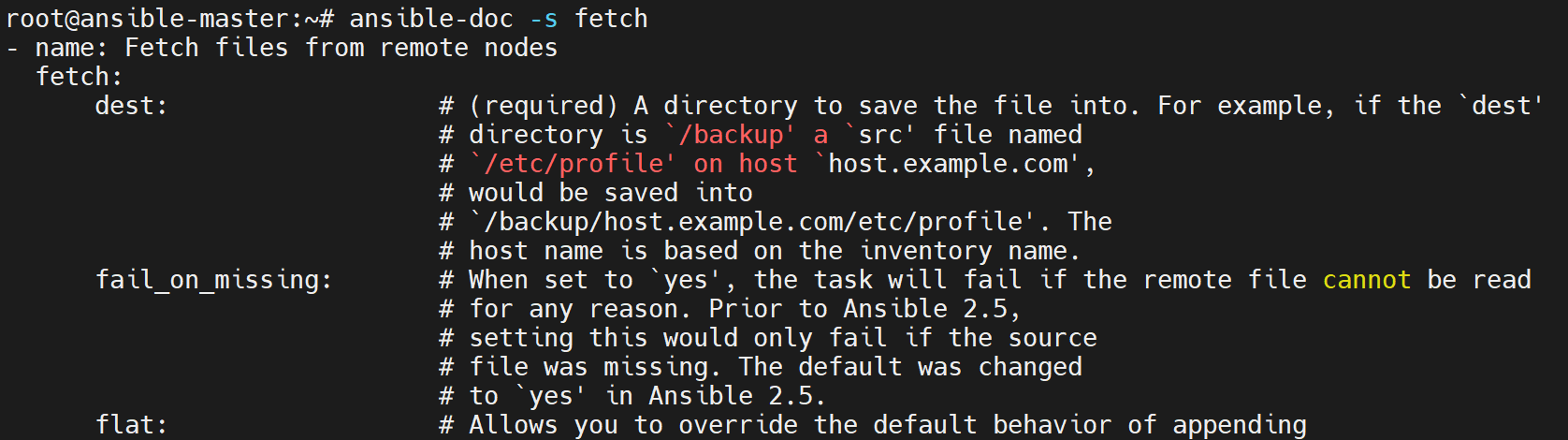
src 是目标上的单个文件,不支持直接用通配符递归取目录;dest 是控制端目的路径。默认生成 dest/主机名/原绝对路径;flat=true 可以去掉主机和源路径层次,但多主机同名文件可能覆盖。
单文件
不清空整个 /tmp,使用专用目的目录:
mkdir -p /tmp/ansible-fetch-lab
ansible 10.0.0.16 -m ansible.builtin.fetch -a 'src=/tmp/tpircs.sh dest=/tmp/ansible-fetch-lab/'
apt install tree -y
tree /tmp/ansible-fetch-lab/
tpircs.sh 沿用课件文件名,需先在目标准备;它与前面的 test.sh 是不同文件。
原始 checksum 记录不受目的目录调整影响:
checksum: 8dcb191fe46af8d3b2f4fa1fcbfb6fc3e297984d
md5sum: 4a215afda9311e91b32b0f99cdced81a
remote_checksum: 8dcb191fe46af8d3b2f4fa1fcbfb6fc3e297984d
remote_md5sum: null
修正后目录预期为:
/tmp/ansible-fetch-lab/
└── 10.0.0.16
    └── tmp
        └── tpircs.sh
3 directories, 1 file
多文件
原文失败示例:
ansible 10.0.0.16 -m ansible.builtin.fetch -a 'src=/var/log/*.log dest=/tmp/ansible-fetch-lab/'
FAILED! => {"changed": false, "msg": "the remote file does not exist, not transferring, ignored"}
先在目标归档,再抓取归档文件:
ansible 10.0.0.16 -m ansible.builtin.shell -a 'tar zcf /tmp/log.tar.gz /var/log/*.log'
ansible 10.0.0.16 -m ansible.builtin.fetch -a 'src=/tmp/log.tar.gz dest=/tmp/ansible-fetch-lab/'
tar tvf /tmp/ansible-fetch-lab/10.0.0.16/tmp/log.tar.gz
原 tar 提示及归档摘要:
tar: 从成员名中删除开头的“/”
tar: 从硬连接目标中删除开头的“/”
checksum: cc3ccfeece585acbe2405451be238b96e4a93f1e
md5sum: 1689ab279807ff1916f885058641a050
源中没有匹配日志时应先处理空列表,不要把失败归档当成完整备份。原文的压缩错误:
tar jcf /tmp/log.tar.xz /var/log/*.log
/bin/sh: 1: bzip2: not found
tar: /tmp/log.tar.xz: Wrote only 4096 of 10240 bytes
tar: Child returned status 127
tar: Error is not recoverable: exiting now
j 对应 bzip2,应配 .tar.bz2;xz 使用 J 和 .tar.xz。缺少压缩工具时要安装相应工具或选择可用格式,失败留下的文件不能作为有效归档。
3.5 stat
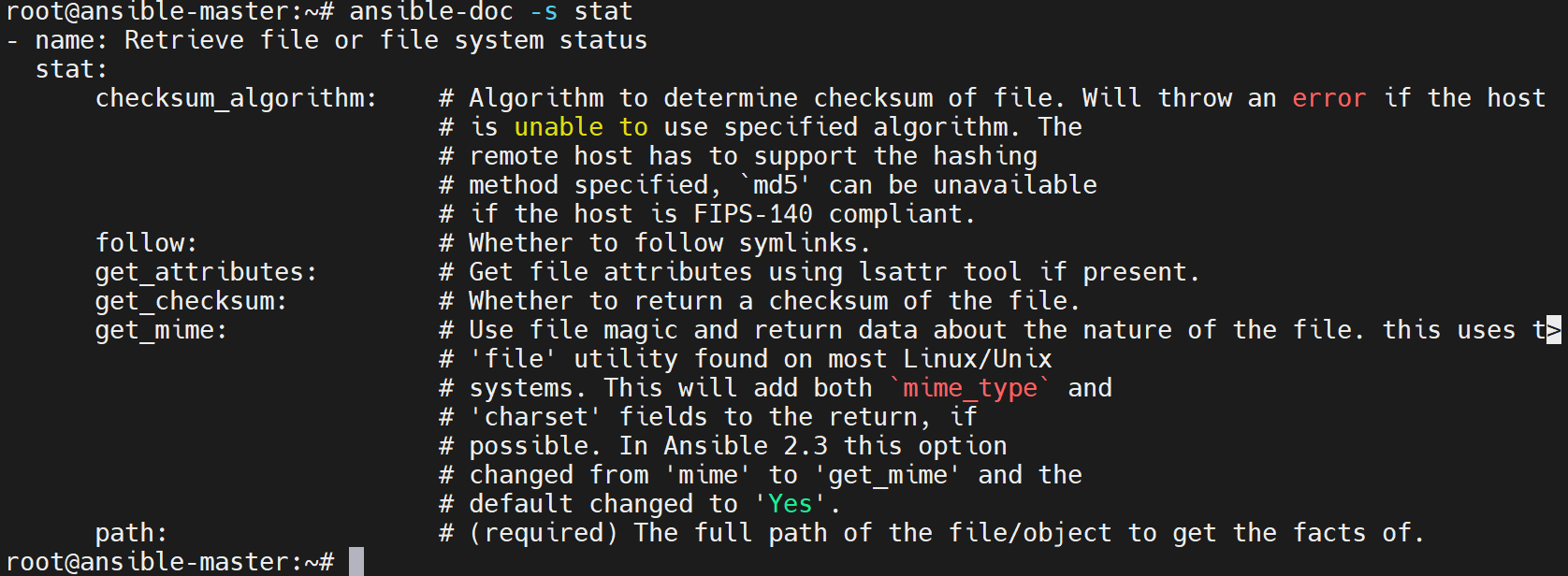
ansible 10.0.0.16 -m ansible.builtin.stat -a 'path=/tmp/script.sh'
ansible 10.0.0.16 -m ansible.builtin.stat -a 'path=/tmp/tpircs.sh'
前者原实验不存在:
{"changed": false, "stat": {"exists": false}}
后者存在时会返回路径、类型、权限、UID/GID、大小、时间、摘要等。原文只展示部分字段:
changed: false
stat:
  atime: 1547223162.4770179
  attr_flags: e
  attributes: [extents]
  block_size: 4096
  blocks: 8
  xusr: false
属性是否返回受平台、参数、目标权限和文件类型影响,使用变量前应检查字段存在。
3.6 get_url
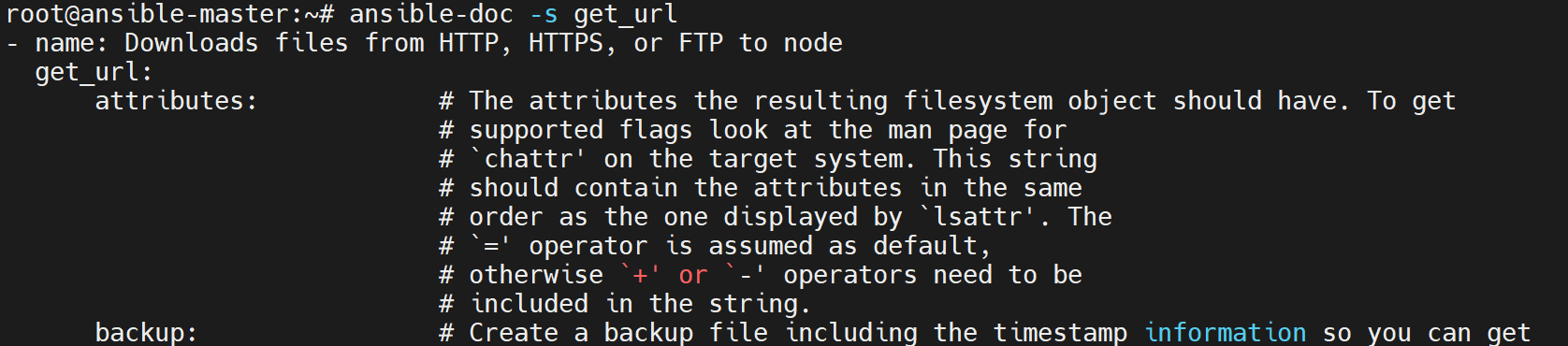
在受管节点从 HTTP、HTTPS 或 FTP 下载文件。dest 使用目标路径;force=false、现有文件和 checksum 的组合影响是否下载,不能说只要同名文件存在就一定跳过。checksum 用来验证下载内容的完整性,不是“正版洁癖”;摘要本身还需要可信来源。
ansible 10.0.0.16 -m ansible.builtin.get_url -a 'url=https://nginx.org/download/nginx-1.18.0.tar.gz dest=/usr/local/src/nginx.tar.gz checksum=md5:b2d33d24d89b8b1f87ff5d251aa27eb8'
ansible 10.0.0.16 -a 'ls -l /usr/local/src/nginx.tar.gz'
这里保留旧版本与 MD5 以复现课件;新交付选择受支持版本并优先用可信 SHA-256 等摘要。目标目录应已存在且可写,HTTPS 证书也须能验证。
原始 HTTP 下载输出:
changed: true
checksum_dest: null
checksum_src: 47b2c5ccd12e2a7088b03d629ff6b9ab18215180
dest: /usr/local/src/nginx.tar.gz
elapsed: 4
gid: 0
group: root
md5sum: b2d33d24d89b8b1f87ff5d251aa27eb8
mode: '0644'
msg: OK (1039530 bytes)
owner: root
size: 1039530
src: /root/.ansible/tmp/ansible-tmp-1733557270.8152976-4726-267946795702593/tmpeuxnhmdr
state: file
status_code: 200
uid: 0
url: http://nginx.org/download/nginx-1.18.0.tar.gz
-rw-r--r-- 1 root root 1039530 1月 12 00:23 /usr/local/src/nginx.tar.gz
不同版本内容与同一旧摘要不匹配的实验,使用独立目标,避免覆盖前一份有效文件:
ansible 10.0.0.16 -m ansible.builtin.get_url -a 'url=https://nginx.org/download/nginx-1.21.5.tar.gz dest=/usr/local/src/nginx-mismatch.tar.gz checksum=md5:b2d33d24d89b8b1f87ff5d251aa27eb8'
原失败输出:
changed: true
checksum_dest: null
checksum_src: c63c01da947ac925ac682a43bf097762a2cc9287
dest: /usr/local/src/nginx.tar.gz
elapsed: 7
msg: The checksum for /usr/local/src/nginx.tar.gz did not match b2d33d24d89b8b1f87ff5d251aa27eb8; it was 55783f98814279d5036cb0feb4a062b7.
src: /root/.ansible/tmp/ansible-tmp-1733557398.8789566-4763-119162282945995/tmpnmqe3l1u
url: http://nginx.org/download/nginx-1.21.5.tar.gz
3.7 archive
community.general.archive 在受管端打包,文件仍保存在受管端;与 fetch 取回控制端不同。

ansible 10.0.0.16 -m ansible.builtin.shell -a 'mkdir -p /tmp/logs; cp /var/log/*.log /tmp/logs/'
ansible 10.0.0.16 -m ansible.builtin.command -a 'ls /tmp/logs/'
原始日志列表:
alternatives.log
apport.log
auth.log
boot.log
bootstrap.log
cloud-init.log
cloud-init-output.log
dpkg.log
fontconfig.log
gpu-manager.log
kern.log
目标需存在 sswang 用户、源日志和支持该格式的依赖。准备目的目录:
ansible 10.0.0.16 -m ansible.builtin.file -a 'path=/data state=directory'
ansible 10.0.0.16 -m community.general.archive -a 'path=/tmp/logs/ dest=/data/log.tar.gz format=gz owner=sswang mode=0600'
ansible 10.0.0.16 -a 'ls -l /data/'
原输出:
archived:
  /tmp/logs/bootstrap.log
  /tmp/logs/apport.log
  /tmp/logs/kern.log
  /tmp/logs/alternatives.log
  /tmp/logs/auth.log
  /tmp/logs/dpkg.log
  /tmp/logs/fontconfig.log
  /tmp/logs/cloud-init.log
  /tmp/logs/gpu-manager.log
  /tmp/logs/boot.log
  /tmp/logs/cloud-init-output.log
arcroot: /tmp/logs/
changed: true
dest: /data/log.tar.gz
dest_state: archive
expanded_exclude_paths: []
expanded_paths: [/tmp/logs/]
gid: 0
group: root
missing: []
mode: '0600'
owner: sswang
size: 60366
state: file
uid: 1000
总计 120
-rw------- 1 sswang root 60366 1月 12 00:28 log.tar.gz
drwxr-xr-x 3 root root 4096 12月 5 2024 softs
3.8 lineinfile
单行维护优先使用 ansible.builtin.lineinfile。regexp 匹配多行时,present 通常只替换最后一条匹配行;absent 会删除所有匹配行。需要替换多个匹配文本可使用 replace。

准备独立测试文件:
ansible 10.0.0.16 -m ansible.builtin.copy -a 'content="server {\n    listen 8080;\n}\n" dest=/tmp/nginx_test.conf'
ansible 10.0.0.16 -a 'cat /tmp/nginx_test.conf'
server {
    listen 8080;
}
原 copy 输出摘要:changed=true、size=25、mode=0644,原始内容校验和为 f697aa7742b164c46a09dd8681740ab590472e9e、MD5 为 8d13f2a0aa1a28193041b653c59f078a。本稿规范缩进及结尾换行后,字节数和摘要会变化。
替换 listen 行并保留语法分号:
ansible 10.0.0.16 -m ansible.builtin.lineinfile -a 'path=/tmp/nginx_test.conf regexp="^\s*listen\s+" line=" listen 80;"'
CHANGED => {"backup": "", "changed": true, "msg": "line replaced"}
原文替换成 listen 80 缺少分号,已修正。
在 fstab 副本中删除注释,不改系统实际挂载配置:
ansible 10.0.0.16 -a 'cat /etc/fstab'
ansible 10.0.0.16 -m ansible.builtin.copy -a 'src=/etc/fstab dest=/tmp/fstab remote_src=true'
ansible 10.0.0.16 -m ansible.builtin.lineinfile -a 'path=/tmp/fstab state=absent regexp="^#"'
ansible 10.0.0.16 -a 'cat /tmp/fstab'
copy 默认源在控制端;这里要复制目标自己的 fstab,因此加 remote_src=true。原例双层双引号也已整理。
原文件含注释头、根分区和 Swap。删除后原实验输出:
CHANGED => {"backup": "", "changed": true, "found": 8, "msg": "8 line(s) removed"}
/dev/disk/by-uuid/5a39c07c-ed04-49e3-aca8-9a99684905e8 / ext4 defaults 0 1
/swap.img none swap sw 0 0
3.9 replace
ansible.builtin.replace 对匹配正则的内容进行替换,可以修改多处;它使用 Python 正则,跨行行为取决于表达式和标志,并非自动按每一行都执行 sed。
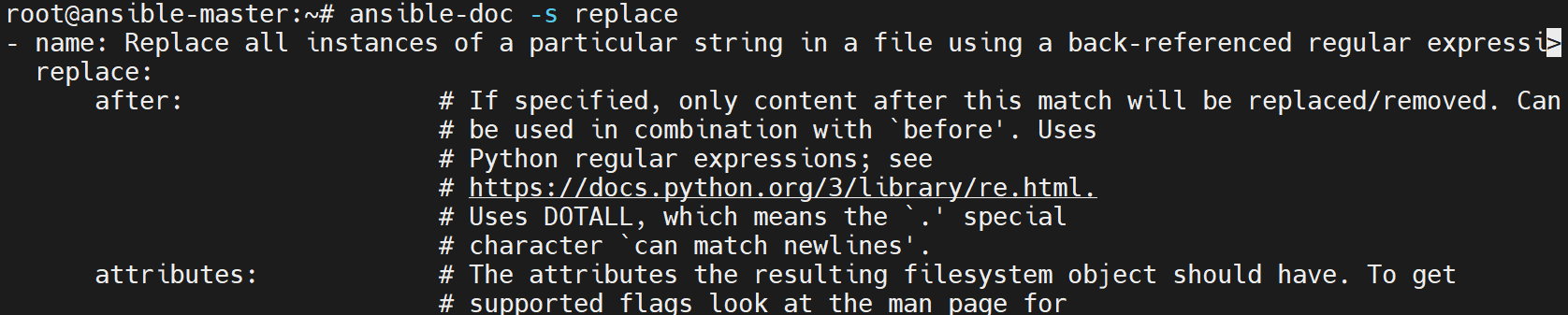
在上一节副本中追加第二条含 defaults 的根分区记录,仅为替换演示:
ansible 10.0.0.16 -m ansible.builtin.shell -a 'grep default /etc/fstab >> /tmp/fstab; cat /tmp/fstab'
/dev/disk/by-uuid/5a39c07c-ed04-49e3-aca8-9a99684905e8 / ext4 defaults 0 1
/swap.img none swap sw 0 0
/dev/disk/by-uuid/5a39c07c-ed04-49e3-aca8-9a99684905e8 / ext4 defaults 0 1
原实验修改并还原 defaults 字段的命令:
ansible 10.0.0.16 -m ansible.builtin.replace -a "path=/tmp/fstab regexp='(defau.*)' replace='#\1'"
ansible 10.0.0.16 -a 'cat /tmp/fstab'
ansible 10.0.0.16 -m ansible.builtin.replace -a "path=/tmp/fstab regexp='#(defau.*)' replace='\1'"
ansible 10.0.0.16 -a 'cat /tmp/fstab'
两次均记录 changed=true、msg="2 replacements made"、rc=0。中间状态:
/dev/disk/by-uuid/5a39c07c-ed04-49e3-aca8-9a99684905e8 / ext4 #defaults 0 1
/swap.img none swap sw 0 0
/dev/disk/by-uuid/5a39c07c-ed04-49e3-aca8-9a99684905e8 / ext4 #defaults 0 1
这是测试副本的文本替换,不等于正确注释了 fstab 条目,不可将中间内容替换系统 fstab。若目标是注释整条挂载记录,应匹配完整行并在行首加 #,同时限定目标条目,避免误改其他挂载。
3.10 apt_repository:添加与删除源
ansible.builtin.apt_repository 管理 Debian 系列 APT 源,通常写入 /etc/apt/sources.list.d/*.list,需要匹配的 Python APT 依赖。
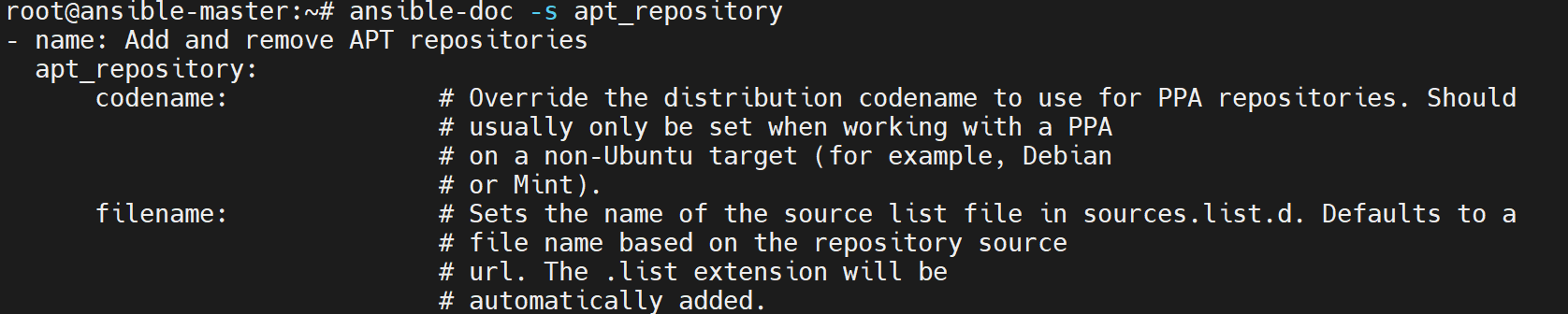
| 参数 | 作用 |
|---|---|
repo |
完整源条目或受支持的 PPA 形式。 |
filename |
目的 list 文件基本名,默认由条目生成,不是默认直接写入 sources.list。 |
state |
present 添加,absent 移除对应条目。 |
update_cache |
源变化后是否更新缓存,默认 true。 |
CLI 实验
此处保留 Chrome 源配置演示,使用 HTTPS,但没有提供签名密钥准备过程,不能把添加条目成功当作安装软件已就绪:
ansible 10.0.0.16 -m ansible.builtin.apt_repository -a 'repo="deb https://dl.google.com/linux/chrome/deb/ stable main" filename=chrome update_cache=false'
ansible 10.0.0.16 -a 'ls /etc/apt/sources.list.d'
原课件使用 HTTP,创建后输出:
changed: true
repo: deb http://dl.google.com/linux/chrome/deb/ stable main
sources_added: [/etc/apt/sources.list.d/chrome.list]
sources_removed: []
state: present

chrome.list
ubuntu.sources
ubuntu.sources.curtin.orig
删除时匹配本稿实际添加的 HTTPS 条目:
ansible 10.0.0.16 -m ansible.builtin.apt_repository -a 'repo="deb https://dl.google.com/linux/chrome/deb/ stable main" filename=chrome state=absent update_cache=false'
ansible 10.0.0.16 -a 'ls /etc/apt/sources.list.d'
若机器上是原课件 HTTP 条目,应删除对应的 HTTP 条目,不是机械照用 HTTPS。删除后源文件列表应只剩原有 Ubuntu 文件;如 list 文件还有其他条目,模块不保证把整个文件删除。
Playbook 实验
以下只演示增加一条 noble main 等组件源,不是完整替代 Ubuntu 安全更新源。已有 ubuntu.sources 时可能重复,执行前应核对现有源布局。
01-apt_add_repo.yml:
- hosts: 10.0.0.16
  become: true
  tasks:
    - name: Add the teaching mirror entry
      ansible.builtin.apt_repository:
        repo: deb https://mirrors.tuna.tsinghua.edu.cn/ubuntu/ noble main restricted universe multiverse
        filename: mirrors_tuna_tsinghua_edu_cn_ubuntu
        state: present
ansible-playbook 01-apt_add_repo.yml
ansible 10.0.0.16 -a 'ls /etc/apt/sources.list.d'
ansible 10.0.0.16 -m ansible.builtin.apt -a 'update_cache=true'

mirrors_tuna_tsinghua_edu_cn_ubuntu.list
ubuntu.sources
ubuntu.sources.curtin.orig
cache_update_time: 1733562046
cache_updated: true
changed: true
02-apt_del_repo.yml:
- hosts: 10.0.0.16
  become: true
  tasks:
    - name: Remove the teaching mirror entry
      ansible.builtin.apt_repository:
        repo: deb https://mirrors.tuna.tsinghua.edu.cn/ubuntu/ noble main restricted universe multiverse
        filename: mirrors_tuna_tsinghua_edu_cn_ubuntu
        state: absent
ansible-playbook 02-apt_del_repo.yml
ansible 10.0.0.16 -a 'ls /etc/apt/sources.list.d'
ansible 10.0.0.16 -m ansible.builtin.apt -a 'update_cache=true'

ubuntu.sources
ubuntu.sources.curtin.orig
cache_update_time: 1733562244
cache_updated: true
changed: true
原 Playbook 的 tasks 和模块缩进已修正。缓存时间及 changed 为原记录,不保证每次执行相同。
3.11 APT 签名密钥
apt_key 用来管理旧式 APT 信任密钥,其底层 apt-key 已弃用,现代发行版不应默认继续用全局信任库。
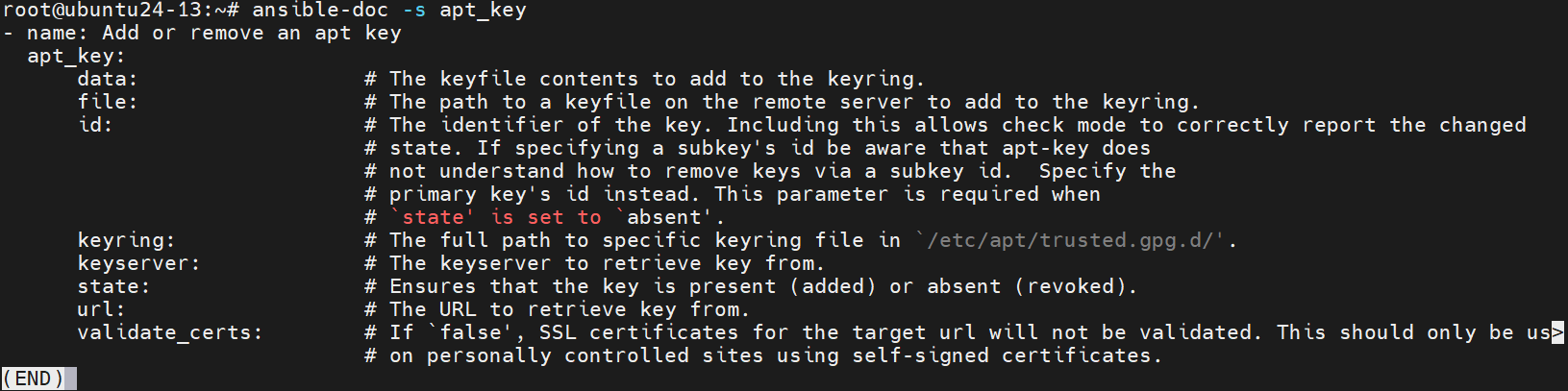
原课件的旧式安装实验:
ansible-doc -s apt_key
ansible 10.0.0.16 -m apt_key -a 'url=https://download.ceph.com/keys/release.asc state=present'
原输出:
{
  "after": ["6ABFA6073131CE23", "E84AC2C0460F3994", "D94AA3F0EFE21092", "871920D1991BC93C"],
  "before": ["6ABFA6073131CE23", "D94AA3F0EFE21092", "871920D1991BC93C"],
  "changed": true,
  "fp": "E84AC2C0460F3994",
  "id": "E84AC2C0460F3994",
  "key_id": "E84AC2C0460F3994",
  "short_id": "460F3994"
}
ansible 10.0.0.16 -m shell -a 'apt-key list | grep ceph'
uid [ unknown] Ceph.com (release key) <security@ceph.com>
Warning: apt-key is deprecated. Manage keyring files in trusted.gpg.d instead (see apt-key(8)).
课件移除后 after 恢复到添加前的三个 ID,before 包含 Ceph 的 E84AC2C0460F3994,changed=true。原移除命令只提供 URL,不应作为当前可靠接口;旧模块移除需按版本要求明确指定正确密钥 ID,先核对完整指纹及其使用者。
现代方式是把核验过的第三方公钥放在独立 keyring 文件,再用源条目的 signed-by 或 deb822 Signed-By 限定信任范围。例如只准备公钥文件:
- hosts: 10.0.0.16
  become: true
  tasks:
    - name: Prepare separate APT keyring directory
      ansible.builtin.file:
        path: /etc/apt/keyrings
        state: directory
        mode: '0755'
    - name: Obtain the repository public key
      ansible.builtin.get_url:
        url: https://download.ceph.com/keys/release.asc
        dest: /etc/apt/keyrings/ceph.asc
        mode: '0644'
这只下载公钥,不增加 Ceph 软件源;源地址、发行版支持和密钥指纹还须按实际版本核对。ASCII armored 公钥使用 .asc,不要仅更名为 .gpg 假装完成 dearmor。
3.12 RPM 软件包管理:yum 与 dnf
原文以 yum 模块和 EL9 输出教学。现代 ansible-core 已移除依赖旧 Python 2 的 yum 后端;DNF 系统优先使用 ansible.builtin.dnf,DNF5 等环境按实际包管理器及插件支持选择。
| 参数 | 作用 |
|---|---|
name |
包名、支持的版本约束、本地 RPM 路径或远程 RPM URL。 |
state |
present/installed 安装,absent/removed 删除,latest 升级到当前仓库最新。 |
list |
查询包、installed、updates、available、repos 等,与修改 name 的任务区分使用。 |
download_only、download_dir |
只下载及目的目录。 |
update_only |
只更新已安装包。 |
autoremove |
移除不再被需要的依赖,行为受 DNF 配置和安装原因影响。 |
enablerepo、disablerepo |
为本次操作启用或禁用仓库。 |
update_cache |
检查及更新过期缓存,依模块和后端支持;不能说完全没有缓存刷新参数。 |
validate_certs |
HTTPS 证书验证。 |
disable_gpg_check |
是否关闭 RPM 签名验证,不能解决依赖不满足。 |
validate_certs 与 GPG 包签名检查是不同层次;关闭它们也不能让不兼容的 EL8 包变成 EL9/EL10 原生包。
ansible 10.0.0.12 -m ansible.builtin.dnf -a 'list=nginx'
ansible 10.0.0.12 -m ansible.builtin.dnf -a 'list=repos'
ansible 10.0.0.12 -m ansible.builtin.dnf -a 'name=nginx state=present'
ansible 10.0.0.12 -m ansible.builtin.shell -a 'dnf list --installed | grep nginx'
原包查询结果:
ansible_facts: {pkg_mgr: dnf}
changed: false
arch: x86_64
envra: 2:nginx-1.20.1-20.el9.0.1.x86_64
epoch: '2'
name: nginx
nevra: 2:nginx-1.20.1-20.el9.0.1.x86_64
release: 20.el9.0.1
repo: appstream
version: 1.20.1
yumstate: available
原启用仓库为 epel、epel-cisco-openh264、baseos、appstream、extras;查询本身 changed=false。
原安装结果:
Installed: rocky-logos-httpd-90.15-2.el9.noarch
Installed: nginx-core-2:1.20.1-20.el9.0.1.x86_64
Installed: nginx-filesystem-2:1.20.1-20.el9.0.1.noarch
Installed: nginx-2:1.20.1-20.el9.0.1.x86_64

nginx.x86_64             2:1.20.1-20.el9.0.1 @appstream
nginx-core.x86_64        2:1.20.1-20.el9.0.1 @appstream
nginx-filesystem.noarch  2:1.20.1-20.el9.0.1 @appstream
删除实验:
ansible 10.0.0.12 -m ansible.builtin.dnf -a 'name=nginx state=absent autoremove=true'
ansible 10.0.0.12 -m ansible.builtin.shell -a 'dnf list --installed | grep nginx'
原结果只移除了 nginx-2:1.20.1-20.el9.0.1.x86_64,nginx-core、nginx-filesystem 仍存在。autoremove 不保证清掉所有相关包及配置文件,RPM 配置也有 .rpmsave/.rpmnew 等语义,不能等同 APT purge。
原文跨大版本 RPM 并跳过验证的记录,仅作为旧实验,不是修正后的安装方案:
ansible 10.0.0.12 -m yum -a 'name=https://mirrors.tuna.tsinghua.edu.cn/zabbix/zabbix/6.0/rhel/8/x86_64/zabbix-agent-6.0.0-1.el8.x86_64.rpm state=present validate_certs=no disable_gpg_check=yes'
Installed: openldap-compat-2.6.6-3.el9.x86_64
Installed: compat-openssl11-1:1.1.1k-4.el9_0.x86_64
Installed: zabbix-agent-6.0.0-1.el8.x86_64
zabbix-agent.x86_64 6.0.0-1.el8 @@commandline
修正方案是配置与目标发行版和架构匹配的可信 Zabbix 仓库、导入其签名公钥,再安装适用版本,不使用 EL8 URL 强行适配 EL9/EL10:
ansible 10.0.0.12 -m ansible.builtin.dnf -a 'name=zabbix-agent state=present'
ansible 10.0.0.12 -m ansible.builtin.dnf -a 'name=zabbix-agent state=absent'
本地 RPM 安装中的路径位于受管节点,安装前需先传过去;缺失依赖要由匹配仓库解决。
3.13 yum_repository
ansible.builtin.yum_repository 管理受管节点的 .repo 文件,常用于 DNF/YUM 仓库。
| 参数 | 作用 |
|---|---|
name |
仓库 ID。 |
description |
仓库描述。 |
baseurl |
仓库地址。 |
enabled |
是否启用。 |
gpgcheck |
是否检查包签名;未指定时按后端与全局配置解释,建议明确设置。 |
gpgkey |
签名公钥位置。 |
state |
present / absent。 |
timeout |
下载超时,默认值及是否支持须按后端版本核对。 |
ansible-doc -s ansible.builtin.yum_repository
ansible 10.0.0.12 -m ansible.builtin.yum_repository -a 'name=nginx description=nginx-desc baseurl="https://nginx.org/packages/centos/$releasever/$basearch/" gpgcheck=true enabled=true gpgkey=https://nginx.org/keys/nginx_signing.key'
ansible 10.0.0.12 -m ansible.builtin.shell -a 'ls /etc/yum.repos.d/ngi*'
ansible 10.0.0.12 -a 'dnf makecache'
整体单引号保留 $releasever、$basearch 给目标包管理器展开。先确认 Nginx 官方仓库支持实际发行版大版本,不能仅靠替换变量推断一定有包。ls 的通配符需要 shell 模块,不应交给默认 command。
CHANGED => {"changed": true, "repo": "nginx", "state": "present"}
/etc/yum.repos.d/nginx.repo
nginx-desc 9.8 kB/s | 2.9 kB
元数据缓存已建立。
其余原输出包括 EPEL、EPEL OpenH264、Rocky 9 BaseOS、AppStream、Extras 的元数据;这是原 EL9 环境记录。
ansible 10.0.0.12 -m ansible.builtin.yum_repository -a 'name=nginx state=absent'
ansible 10.0.0.12 -m ansible.builtin.shell -a 'ls /etc/yum.repos.d/ngi*'
ansible 10.0.0.12 -a 'dnf makecache'
删除后原实验:
CHANGED => {"changed": true, "repo": "nginx", "state": "absent"}
FAILED | rc=2 >>
ls: 无法访问 '/etc/yum.repos.d/ngi*': 没有那个文件或目录
若没有其他匹配文件,ls 的非零状态是删除后的预期观察,不表示仓库删除任务失败。后续 makecache 不再包含 nginx-desc。
3.14 setup 与 Facts
ansible.builtin.setup 收集受管主机的 Facts,可在 Playbook 后续任务引用。filter 使用通配匹配过滤返回键,不是任意正则;默认 Facts 也不是操作系统所有可能属性的全集。

| 参数 | 用途 |
|---|---|
fact_path |
目标自定义 Facts 目录,常见 /etc/ansible/facts.d。 |
filter |
对返回 Facts 的键做匹配过滤,通常不减少底层全部采集成本。 |
gather_subset |
控制采集范围,按目标支持的子集选择。 |
Play 的 gather_facts: false 关闭隐式采集,不会自动提供未采集的值;仍可通过 setup 显式收集或使用已配置的缓存。
简单查询
ansible 10.0.0.16 -m ansible.builtin.setup -a 'filter=ansible_memtotal_mb'
ansible 10.0.0.16 -m ansible.builtin.setup -a 'filter=*ens*'
ansible 10.0.0.16 -m ansible.builtin.setup -a 'filter=ansible_all_ipv4_addresses'
ansible 10.0.0.16 -m ansible.builtin.setup -a 'filter=ansible_default_ipv4'
原内存结果为 3868 MB;网卡字段中 ansible_ens33.active=true、device=ens33。所有 IPv4 列表为 ["10.0.0.16"],默认路由接口结果:
{
  "ansible_facts": {
    "ansible_default_ipv4": {
      "address": "10.0.0.16",
      "alias": "ens33",
      "broadcast": "10.0.0.255",
      "gateway": "10.0.0.2",
      "interface": "ens33",
      "macaddress": "00:50:56:26:58:e4",
      "mtu": 1500,
      "netmask": "255.255.255.0",
      "network": "10.0.0.0",
      "prefix": "24",
      "type": "ether"
    }
  },
  "changed": false
}
CLI 获取 IP
原命令通过单行回调输出切分 JSON:
ansible 10.0.0.16 -m ansible.builtin.setup -a 'filter=ansible_all_ipv4_addresses' -o | awk -F '=>' '{print $2}' | jq -r '.ansible_facts.ansible_all_ipv4_addresses[0]'
10.0.0.16
-o 是单行显示,不是把整个命令输出变成有稳定 schema 的纯 JSON;本例依赖旧版本回调、单主机且执行成功。不能把它当作跨版本可靠 API,异常输出也必须另外处理。
按原多行展示格式抽取的示例:
ansible 10.0.0.16 -m ansible.builtin.setup -a 'filter=ansible_all_ipv4_addresses' | awk -F'"' '/ansible_all_ipv4_addresses/ {getline; print $2}'
alias ansible_getip="ansible 10.0.0.16 -m ansible.builtin.setup -a 'filter=ansible_all_ipv4_addresses' | awk -F'\"' '/ansible_all_ipv4_addresses/ {getline; print \$2}'"
ansible_getip
同样依赖显示格式。IP 列表第一个地址不保证是主地址;主路由地址应查询 default_ipv4.address,不存在默认路由时字段可能不存在。结构化自动化优先在 Playbook 内引用 Facts,或选择兼容的结构化结果输出方案。
其他常用查询:
ansible 10.0.0.16 -m ansible.builtin.setup
ansible 10.0.0.16 -m ansible.builtin.setup -a 'filter=ansible_nodename'
ansible 10.0.0.16 -m ansible.builtin.setup -a 'filter=ansible_hostname'
ansible 10.0.0.16 -m ansible.builtin.setup -a 'filter=ansible_domain'
ansible 10.0.0.16 -m ansible.builtin.setup -a 'filter=ansible_memtotal_mb'
ansible 10.0.0.16 -m ansible.builtin.setup -a 'filter=ansible_memory_mb'
ansible 10.0.0.16 -m ansible.builtin.setup -a 'filter=ansible_memfree_mb'
ansible 10.0.0.16 -m ansible.builtin.setup -a 'filter=ansible_os_family'
ansible 10.0.0.16 -m ansible.builtin.setup -a 'filter=ansible_distribution_major_version'
ansible 10.0.0.16 -m ansible.builtin.setup -a 'filter=ansible_distribution_version'
ansible 10.0.0.16 -m ansible.builtin.setup -a 'filter=ansible_processor_vcpus'
ansible 10.0.0.16 -m ansible.builtin.setup -a 'filter=ansible_all_ipv4_addresses'
ansible 10.0.0.16 -m ansible.builtin.setup -a 'filter=ansible_architecture'
ansible 10.0.0.16 -m ansible.builtin.setup -a 'filter=ansible_processor*'
3.15 debug
ansible.builtin.debug 在控制端输出消息、变量和诊断,msg 与 var 互斥,verbosity 选择显示所需的详细等级。通式中的有效参数不是 name=主机名。
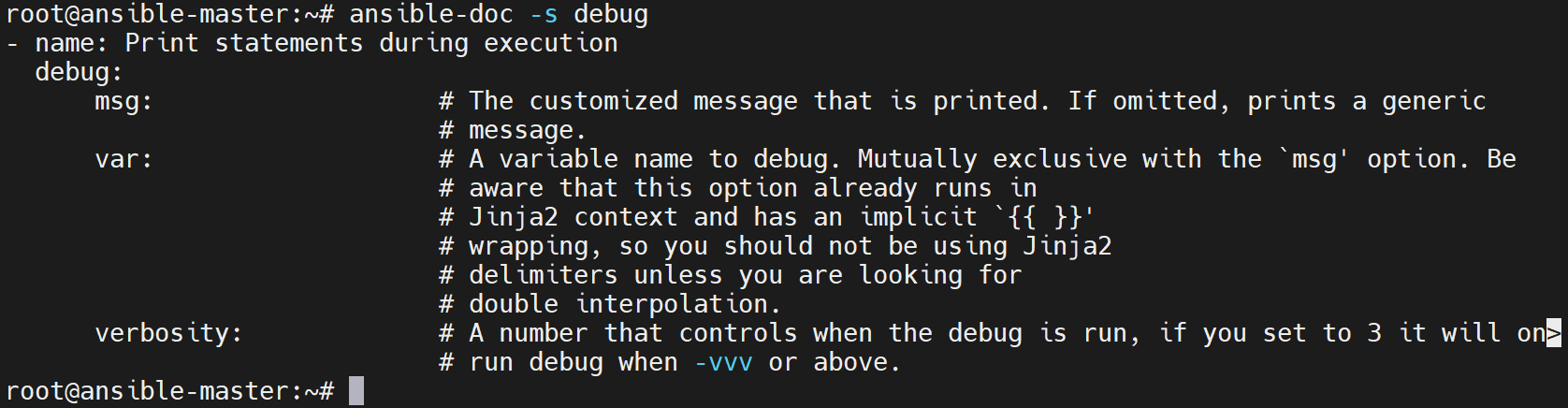
ansible 10.0.0.16 -m ansible.builtin.debug
ansible 10.0.0.16 -m ansible.builtin.debug -a 'msg="hello debug"'
ansible 10.0.0.16 -m ansible.builtin.debug -a 'var=buzhidao'
ansible 10.0.0.16 -m ansible.builtin.debug -a 'msg="this is test msg" verbosity=2'
ansible 10.0.0.16 -m ansible.builtin.debug -a 'msg="this is test msg" verbosity=2' -vv
原结果依次为:
SUCCESS => {"msg": "Hello world!"}
SUCCESS => {"msg": "hello debug"}
SUCCESS => {"buzhidao": "VARIABLE IS NOT DEFINED!"}
SKIPPED
SUCCESS => {"msg": "this is test msg"}
最后一条还输出 core 2.18.6、/root/ansible.cfg、Python 3.12.3、Jinja 3.1.2 及回调选择信息。verbosity 不是系统运行级别,不会更改目标服务。
默认消息与定制消息
03-debug-default.yml:
- hosts: 10.0.0.16
  tasks:
    - name: Output the default message
      ansible.builtin.debug: {}
ansible-playbook 03-debug-default.yml
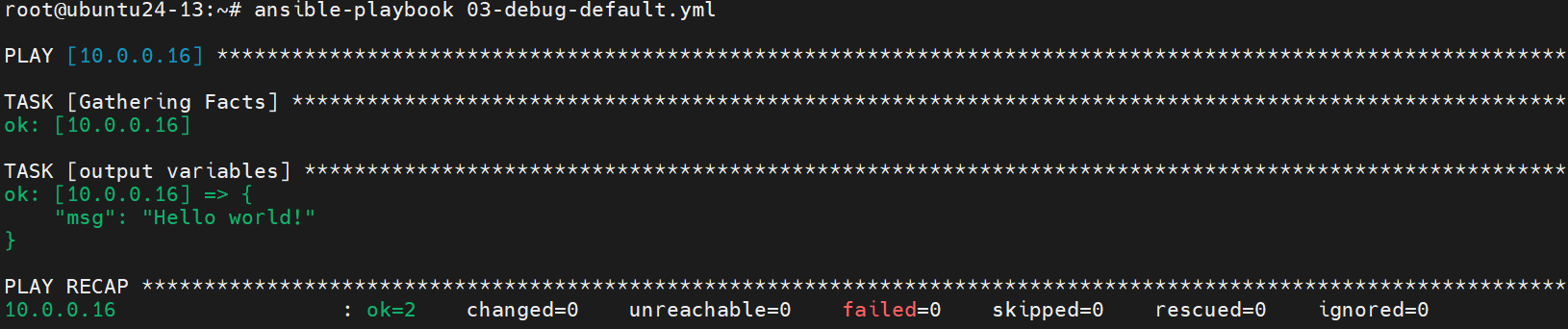
04-debug-msg.yml:
- hosts: 10.0.0.16
  gather_facts: true
  tasks:
    - name: Output host name and default route address
      ansible.builtin.debug:
        msg: 'Host "{{ ansible_facts["nodename"] }}" is "{{ ansible_facts.get("default_ipv4", {}).get("address", "无默认 IPv4 路由") }}"'
ansible-playbook 04-debug-msg.yml
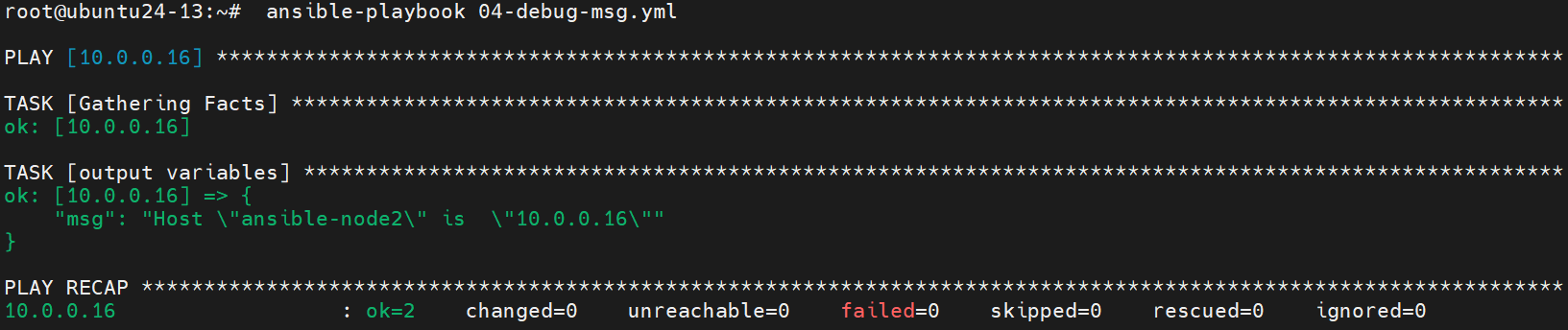
var 与 msg 不能放在同一任务
原 05-debug-varmsg-error.yml 的错误关键内容:
debug: var=nginx_num msg="System {{ inventory_hostname }} has nginx service."
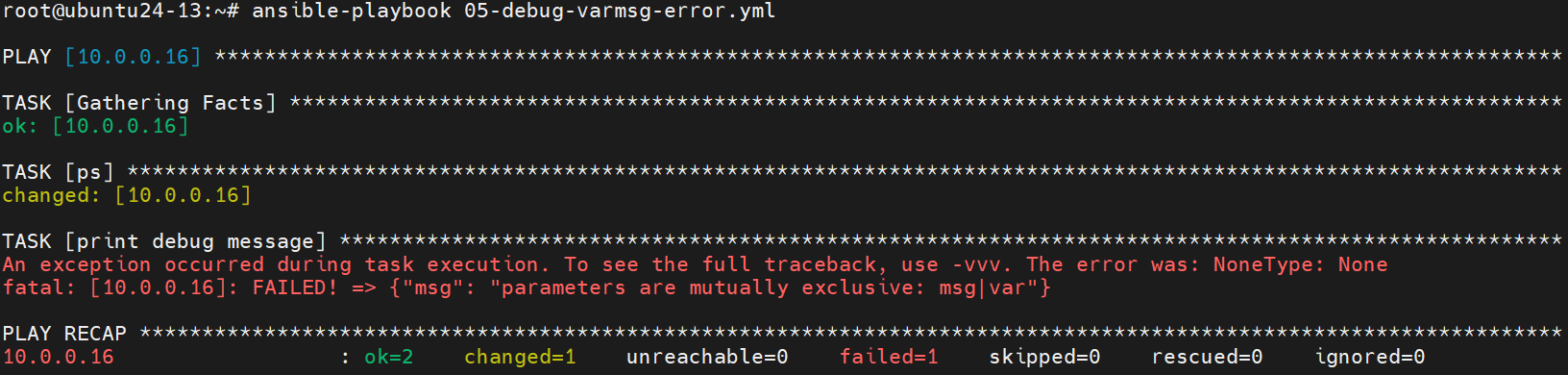
修正后的 06-debug-varmsg-ok.yml 将二者分开,也避免把查询任务报告为变更:
- hosts: 10.0.0.16
  remote_user: root
  tasks:
    - name: Count Nginx processes
      ansible.builtin.command: pgrep -c -x nginx
      register: nginx_num
      changed_when: false
      failed_when: nginx_num.rc not in [0, 1]
    - name: Show the full query result
      ansible.builtin.debug:
        var: nginx_num
    - name: Show the process count
      ansible.builtin.debug:
        msg: 'System {{ inventory_hostname }} has {{ nginx_num.stdout }} Nginx processes.'
pgrep 需安装,返回 1 表示没有匹配,其他错误仍失败;进程数不等于服务健康。原文用 ps -ef | grep nginx | grep -v grep | wc -l,截图计数为 0:
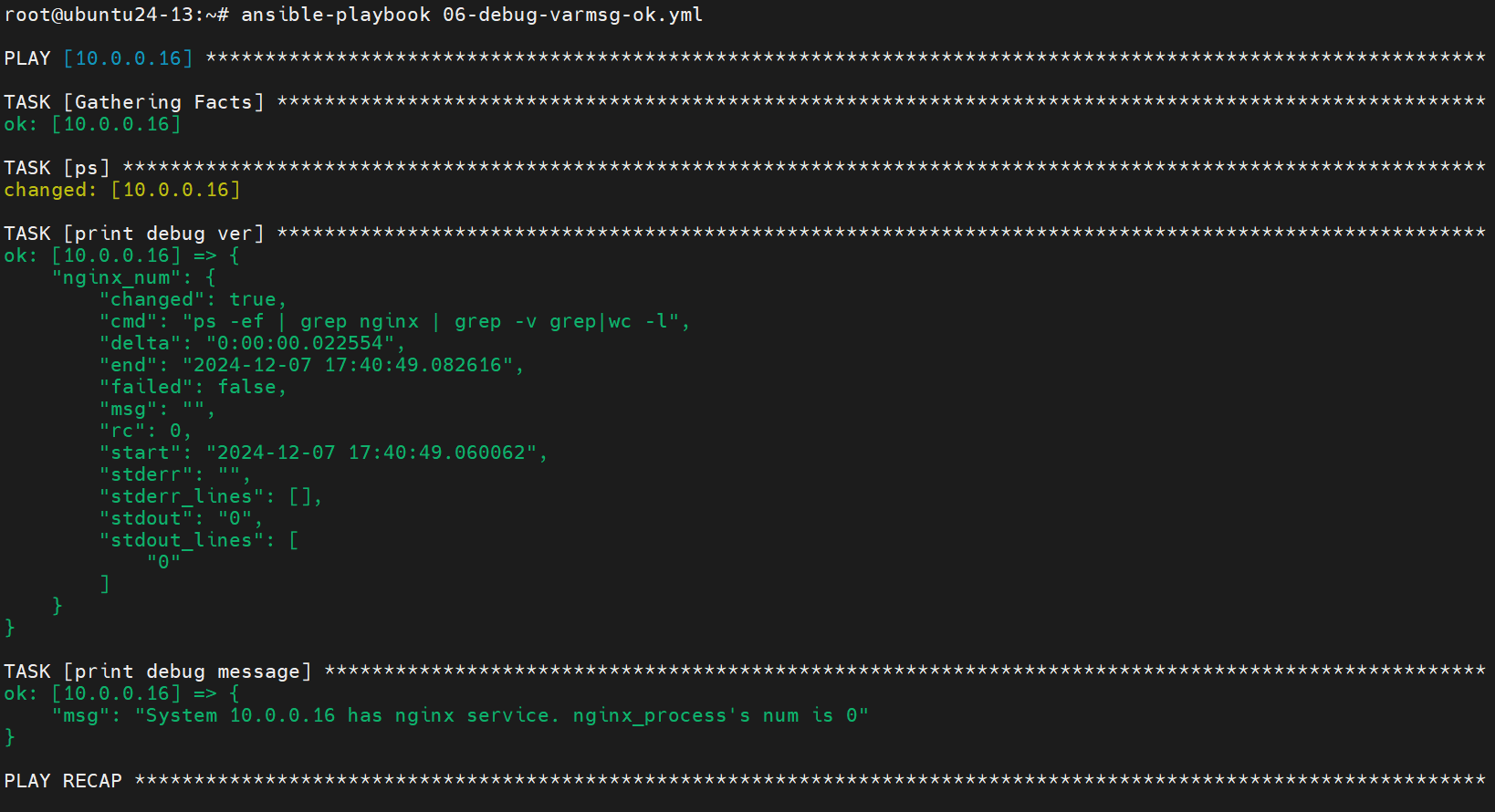
ansible-playbook 06-debug-varmsg-ok.yml
Facts 必须先收集
原 get_fact.yaml 关闭采集,还重复定义两个 tasks 键,前一个可能被覆盖,且引用未定义 Facts。原截图显示 VARIABLE IS NOT DEFINED:
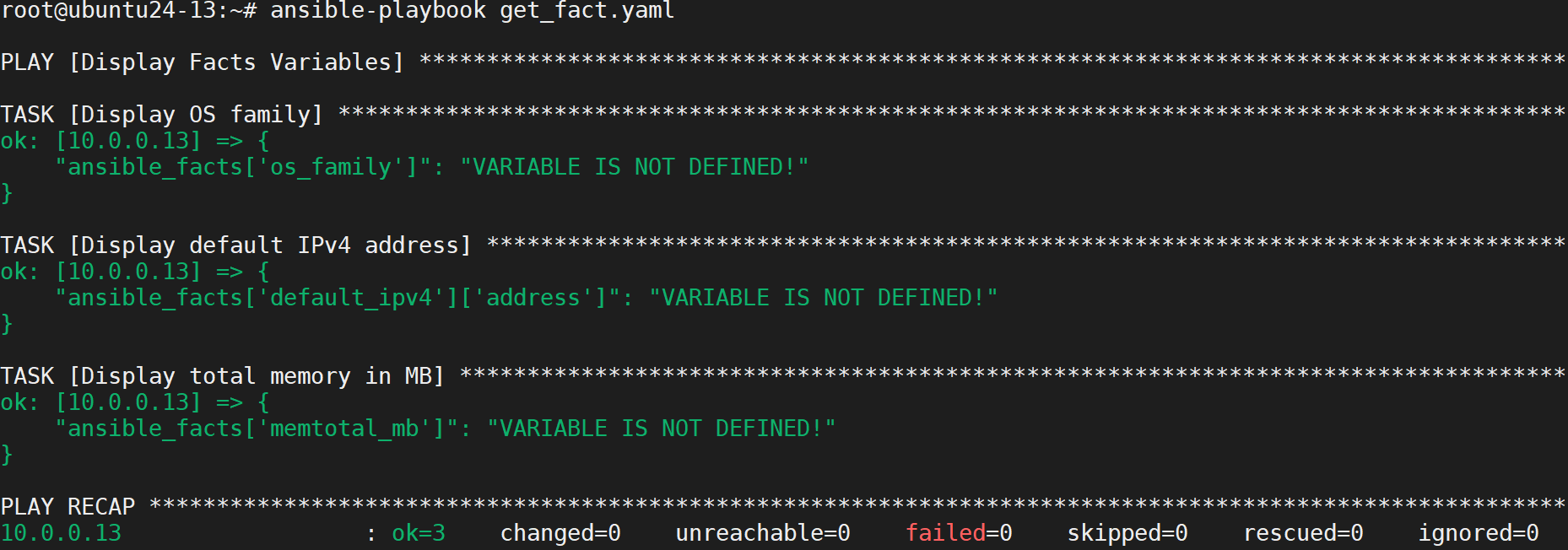
修正为单一 tasks 列表并启用采集:
- name: Display Facts Variables
  hosts: 10.0.0.13
  gather_facts: true
  tasks:
    - name: Display OS family
      ansible.builtin.debug:
        var: ansible_facts['os_family']
    - name: Display default IPv4 address
      ansible.builtin.debug:
        msg: '{{ ansible_facts.get("default_ipv4", {}).get("address", "无默认 IPv4 路由") }}'
    - name: Display total memory in MB
      ansible.builtin.debug:
        var: ansible_facts['memtotal_mb']
ansible-playbook get_fact.yaml
汇总主机信息
get_msg_fact.yaml:
- name: 收集目标主机系统信息并提取 IPv4 地址
  hosts: all
  gather_facts: true
  tasks:
    - name: 显示主机基本信息
      ansible.builtin.debug:
        msg:
          - '主机名: {{ ansible_facts["hostname"] }}'
          - '操作系统: {{ ansible_facts["distribution"] }} {{ ansible_facts["distribution_version"] }}'
          - '内核版本: {{ ansible_facts["kernel"] }}'
    - name: 提取并显示所有 IPv4 地址
      ansible.builtin.debug:
        var: ansible_facts['all_ipv4_addresses']
      when: ansible_facts['all_ipv4_addresses'] is defined
    - name: 显示列表第一个 IPv4 地址
      ansible.builtin.debug:
        msg: '列表第一个 IPv4: {{ ansible_facts["all_ipv4_addresses"][0] }}'
      when:
        - ansible_facts['all_ipv4_addresses'] is defined
        - ansible_facts['all_ipv4_addresses'] | length > 0
ansible-playbook get_msg_fact.yaml
原课件这次清单另外包含 .14,不属于前面三节点清单。其原结果按主机整理:
| 主机 | 主机名 | 系统 | 内核 |
|---|---|---|---|
| 10.0.0.14 | openeuler-14 | openEuler 24.03 | 6.6.0-28.0.0.34.oe2403.x86_64 |
| 10.0.0.12 | rocky-12 | Rocky 9.4 | 5.14.0-427.13.1.el9_4.x86_64 |
| 10.0.0.13 | ubuntu24-13 | Ubuntu 24.04 | 6.8.0-31-generic |
| 10.0.0.16 | ubuntu24-16 | Ubuntu 24.04 | 6.8.0-31-generic |
每台 ansible_all_ipv4_addresses 分别为只含本机 IP 的单元素列表,因此原示例“主 IPv4”的显示恰好也是该 IP。这里已把名称改为列表第一个地址,不误称主地址。
PLAY [收集目标主机系统信息并提取IPv4地址]
TASK [Gathering Facts]              ok: [.16, .13, .14, .12]
TASK [显示主机基本信息]              每台显示上表的主机名、系统及内核
TASK [提取并显示所有IPv4地址]         分别显示本机 IP 列表
TASK [显示主IPv4地址(第一个地址)]    分别显示 10.0.0.14、.12、.13、.16
PLAY RECAP
10.0.0.12 : ok=4 changed=0 unreachable=0 failed=0 skipped=0 rescued=0 ignored=0
10.0.0.13 : ok=4 changed=0 unreachable=0 failed=0 skipped=0 rescued=0 ignored=0
10.0.0.14 : ok=4 changed=0 unreachable=0 failed=0 skipped=0 rescued=0 ignored=0
10.0.0.16 : ok=4 changed=0 unreachable=0 failed=0 skipped=0 rescued=0 ignored=0
4. Ansible 配套命令
4.1 ansible-console
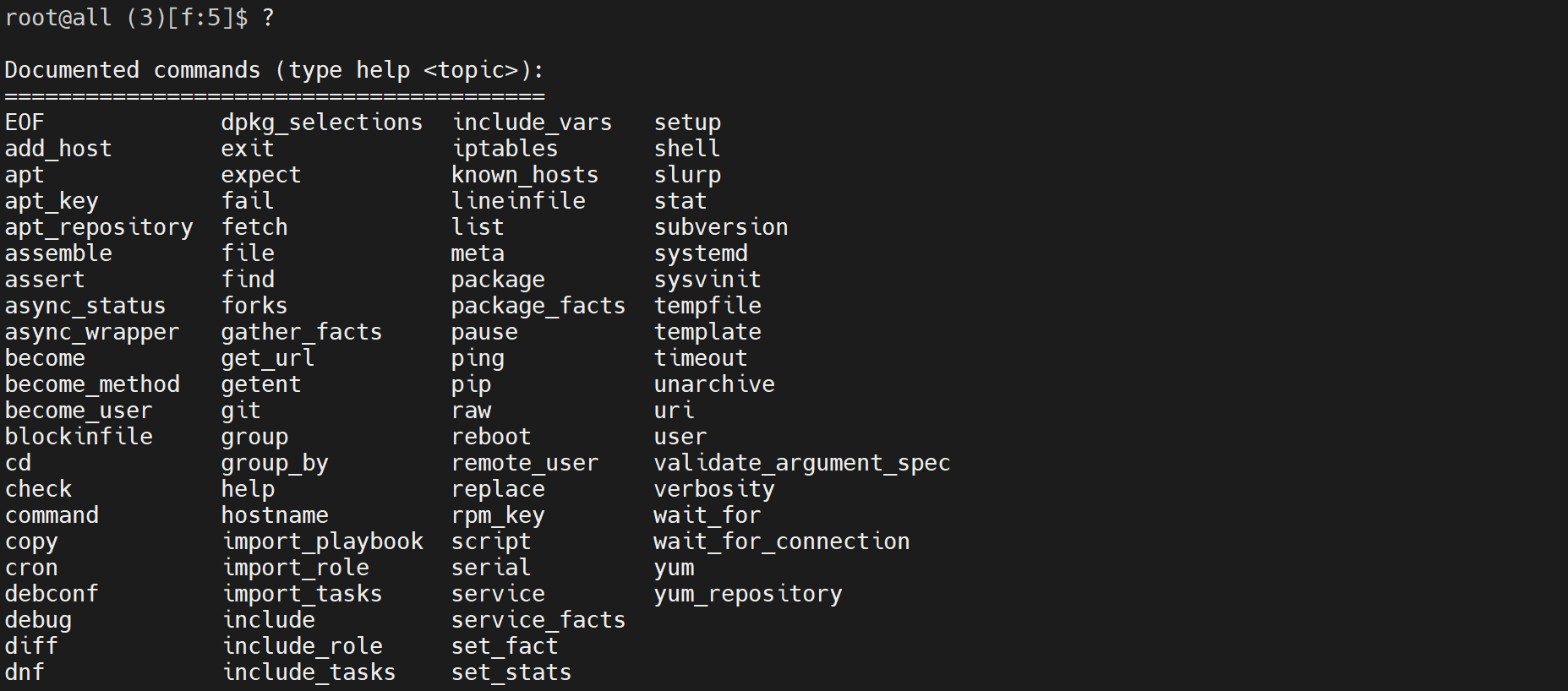
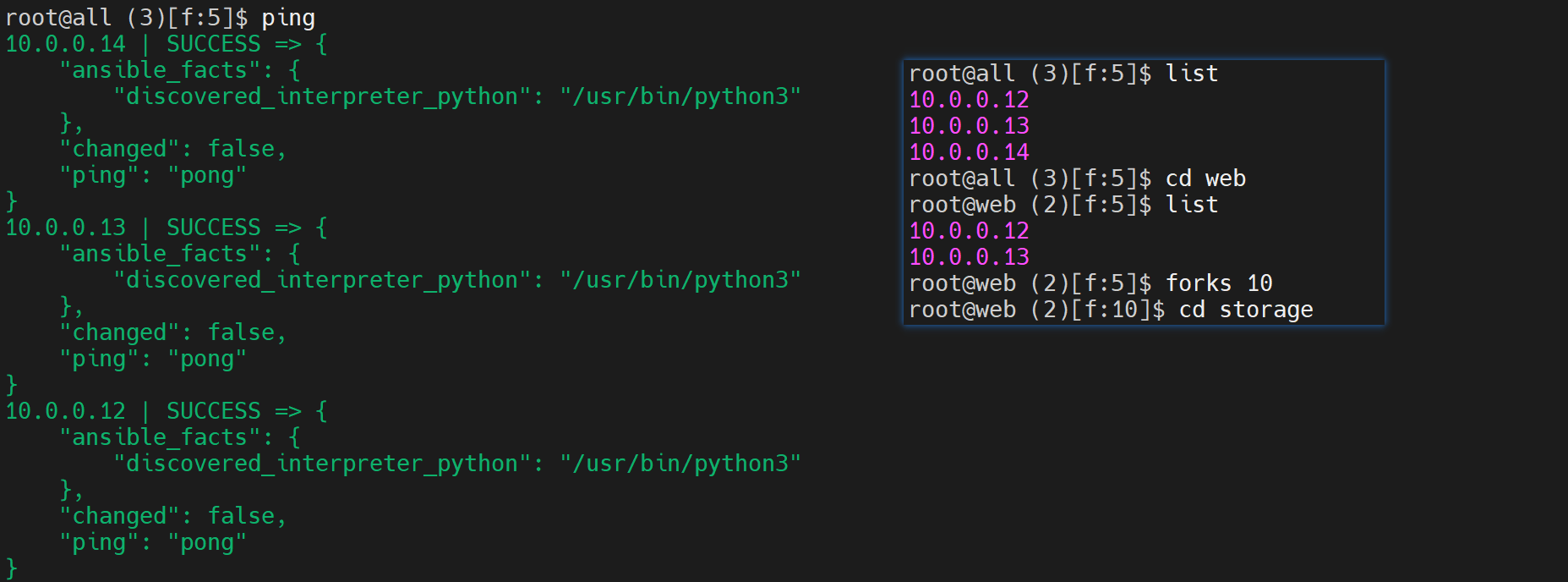
交互式控制台可以在当前目标组运行模块,支持补全。其提示符通常显示:
执行用户@目标组 (主机数)[f:并发数]$ 模块 参数
ansible-console

控制台内常用命令:
help
?
list
cd web
forks 10
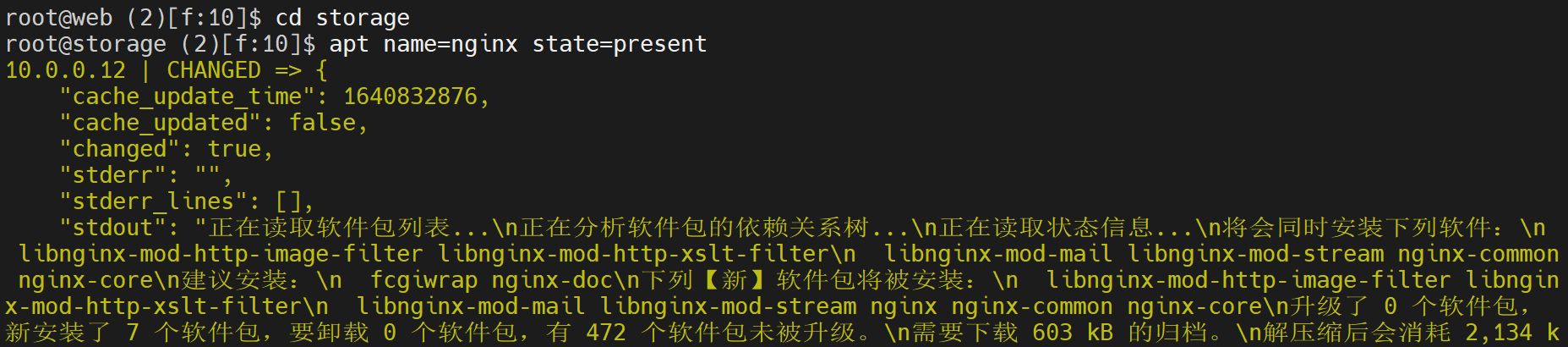
cd storage
ping
apt name=nginx state=present
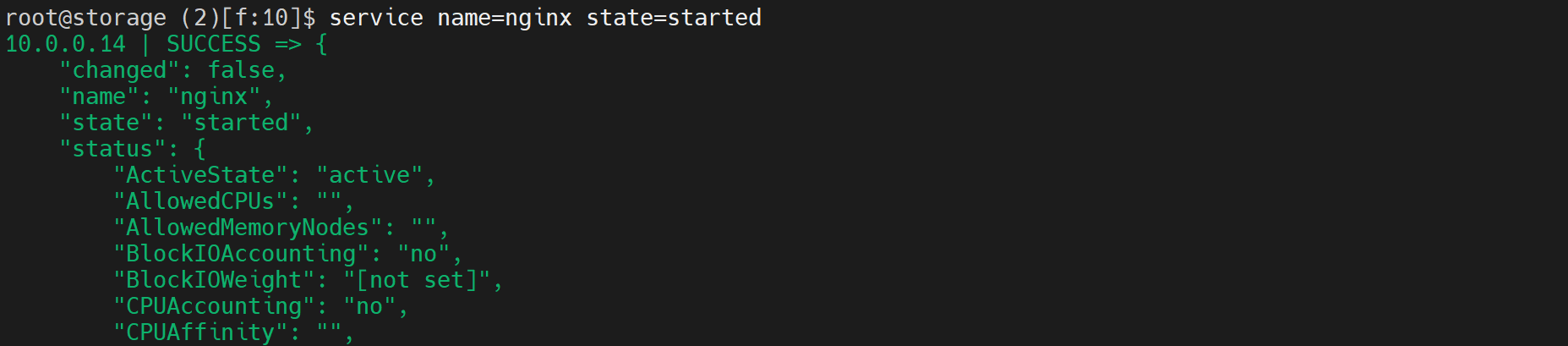
service name=nginx state=started
exit
cd 在这里选择目标组,不是普通 Shell 切换目录。apt 的目标组必须都是支持 APT 的系统,不能照搬给混合发行版的 storage 组。命令会实际影响目标,并非仅本机练习。
4.2 ansible-galaxy
Galaxy 提供共享的 Role 和 Collection。传统 Role 常命名为 namespace.role_name;Collection 是 namespace.collection_name,包含模块、插件和角色等,不是站点全部内容都只按 username.role 命名。
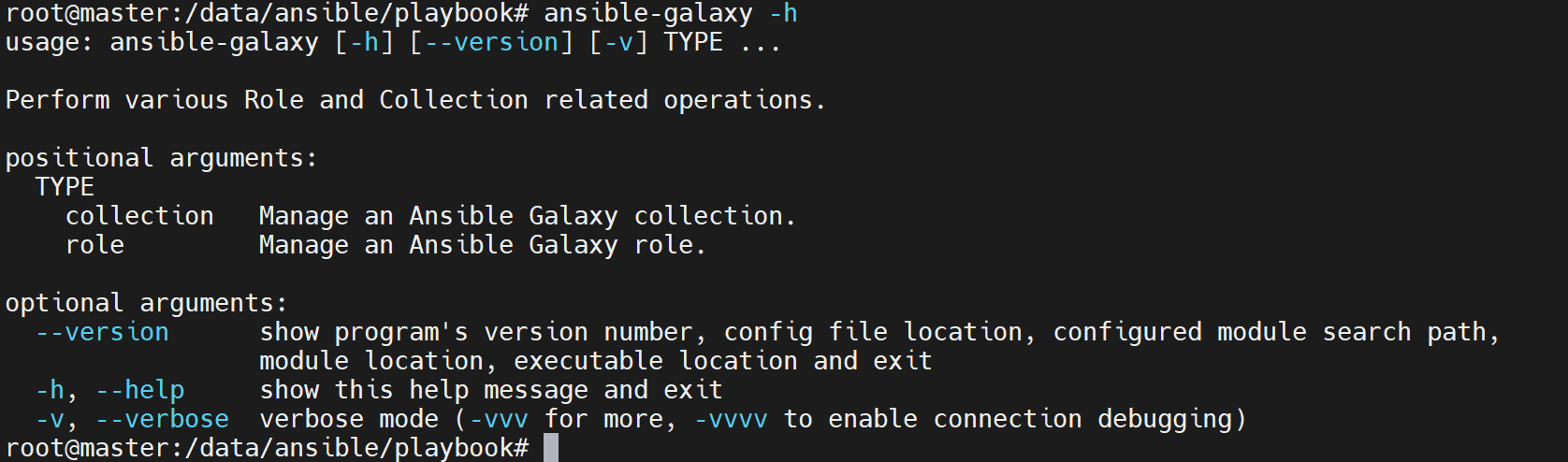
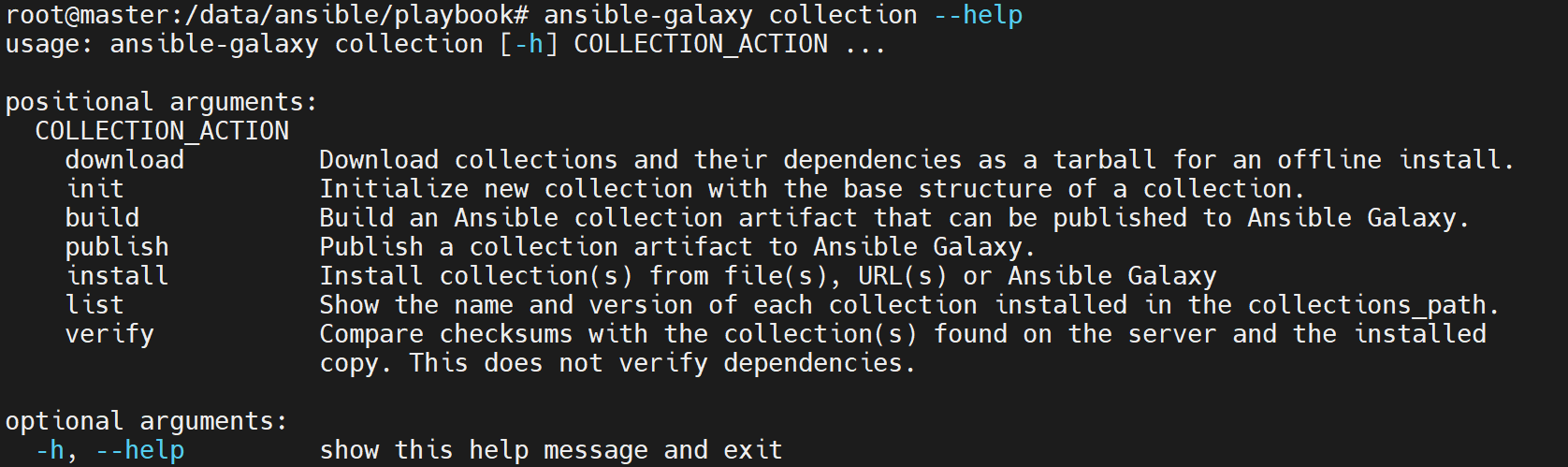
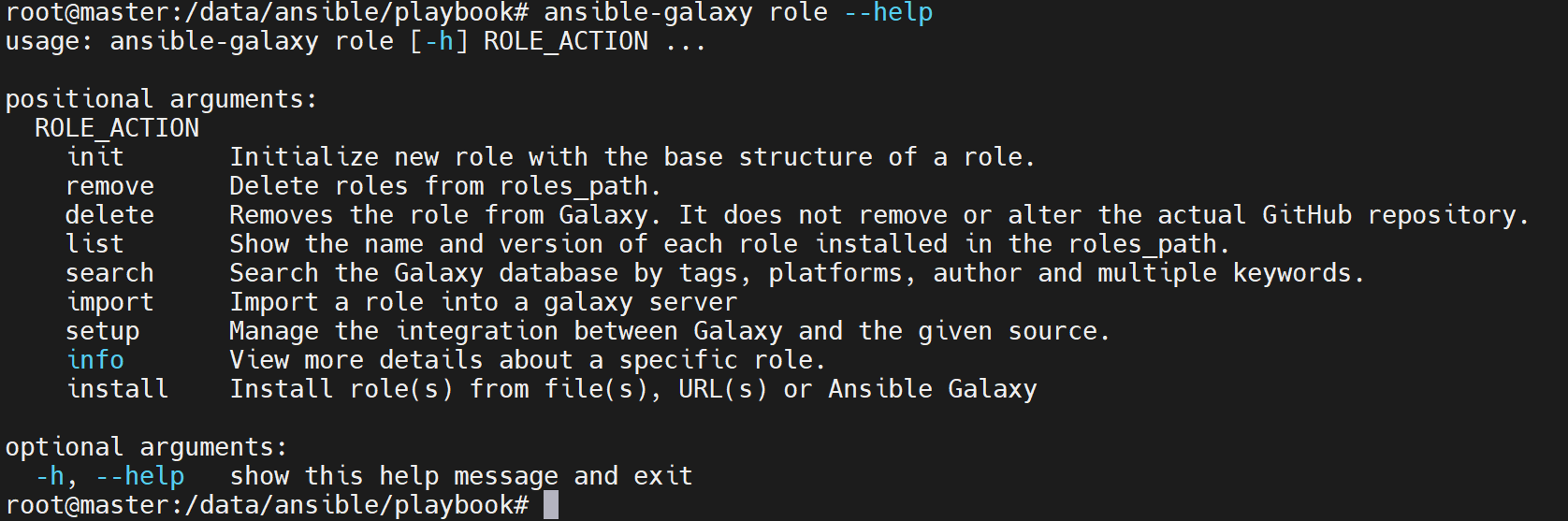
旧版本的登录、导入、删除远端内容等能力随 Galaxy 服务和版本变化,不能保证老命令和旧 API 现在仍可用。日常下载、管理本地 Role 建议显式写 role 子命令。
列表、安装路径和固定版本
ansible-galaxy role list
ansible-galaxy role list username.role_name
ansible-galaxy role install username.role_name
ansible-galaxy role install --roles-path . username.role_name
ansible-galaxy role install username.role_name,v1.0.0
--roles-path 不是原文拼错的 --role-pash。实际搜索和安装目录受配置及参数影响,常见有 ~/.ansible/roles、/usr/share/ansible/roles、/etc/ansible/roles,并不保证总装在 /etc/ansible/roles。
Git 源 Role 安装通式:
ansible-galaxy role install git+https://github.com/geerlingguy/ansible-role-apache.git,<实际分支、标签或提交>
requirements.yml 示例:
- src: username.role_name
- src: https://github.com/galaxy/nginx
- src: https://github.com/galaxy/nginx
  version: master
  name: nginx_role
- src: https://some.webserver.example.com/files/master.tar.gz
  name: http-role
以上来源是格式示例,不保证这些旧仓库仍存在;指定实际可访问、受信任的版本后安装:
ansible-galaxy role install -r requirements.yml
推荐用 requirements 的 name 选择本地名称。也可重命名目录,但后续角色引用、依赖和升级配置要同步,不能一概认为仅改目录就完全不受影响。
初始化 Role
mkdir -p /data/ansible/galaxy
cd /data/ansible/galaxy
ansible-galaxy role init roles_name
tree roles_name/
- Role roles_name was created successfully
roles_name/
├── defaults
│   └── main.yml
├── files
├── handlers
│   └── main.yml
├── meta
│   └── main.yml
├── README.md
├── tasks
│   └── main.yml
├── templates
├── tests
│   ├── inventory
│   └── test.yml
└── vars
    └── main.yml
9 directories, 8 files
ansible-galaxy role list
ansible-galaxy role list --roles-path .
原记录默认全局路径未发现已安装角色,另有 /root/.ansible/roles、/usr/share/ansible/roles 不存在的 WARNING;使用当前目录后显示:
# /data/ansible/galaxy
- roles_name, (unknown version)
# /etc/ansible/roles
初始化只是生成结构,并没有自动上传到 Galaxy。发布、导入或远端删除要单独按服务端流程执行。
Redis Role 实验
ansible-galaxy role list
ansible-galaxy role search redis
ansible-galaxy role info aaronpederson.redis
ansible-galaxy role install davidwittman.redis
原搜索结果数量及项名:
Found 233 roles matching your search:
Name                 Description
aaronpederson.redis  Redis is an open source, BSD ...
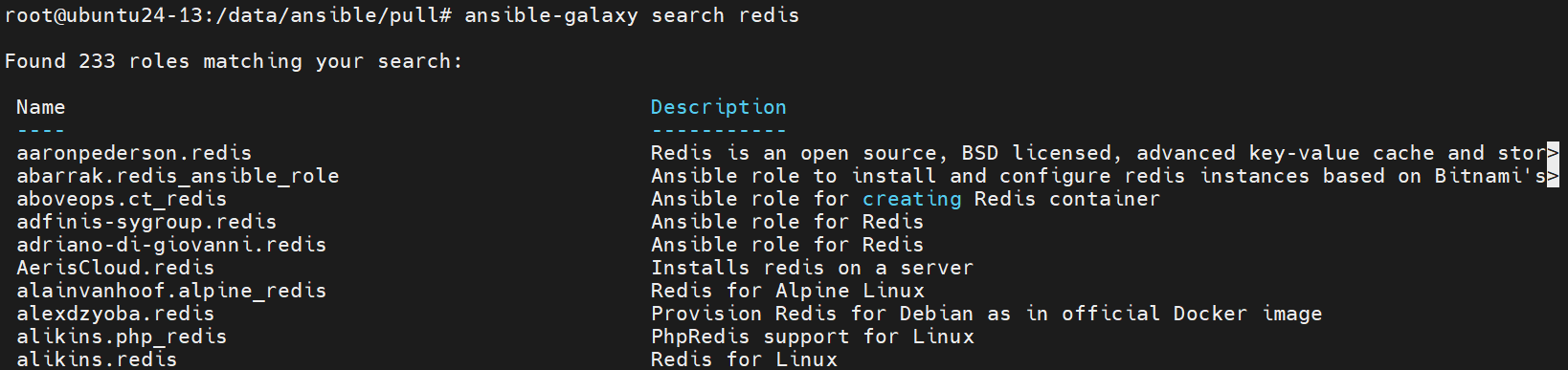
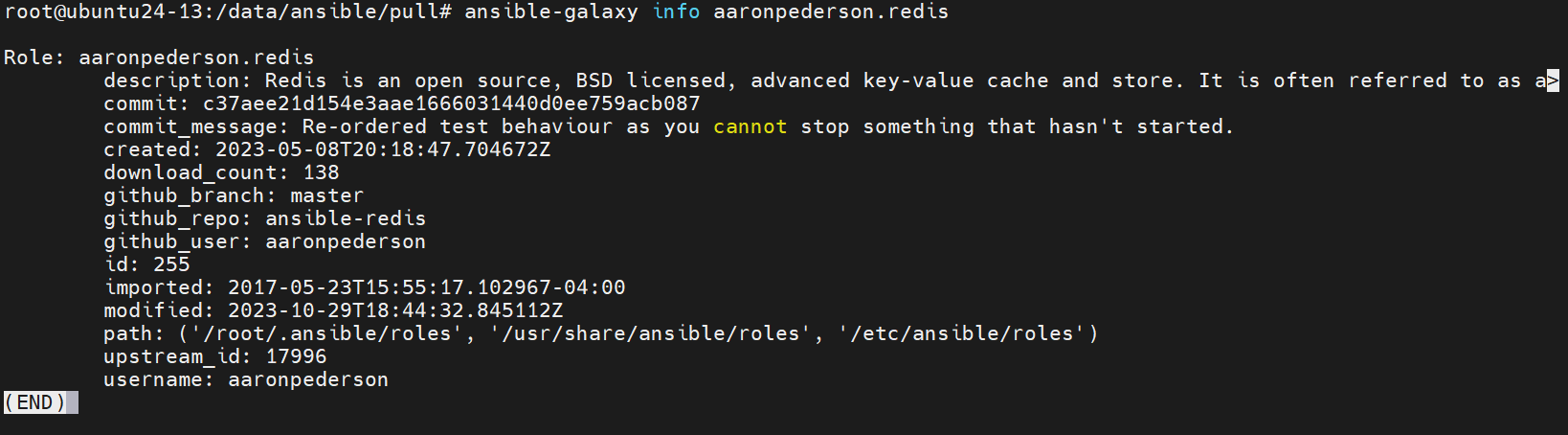
原安装成功记录:
Starting galaxy role install process
- downloading role 'redis', owned by davidwittman
- downloading role from https://github.com/DavidWittman/ansible-redis/archive/1.2.9.tar.gz
- extracting davidwittman.redis to /root/.ansible/roles/davidwittman.redis
- davidwittman.redis (1.2.9) was installed successfully

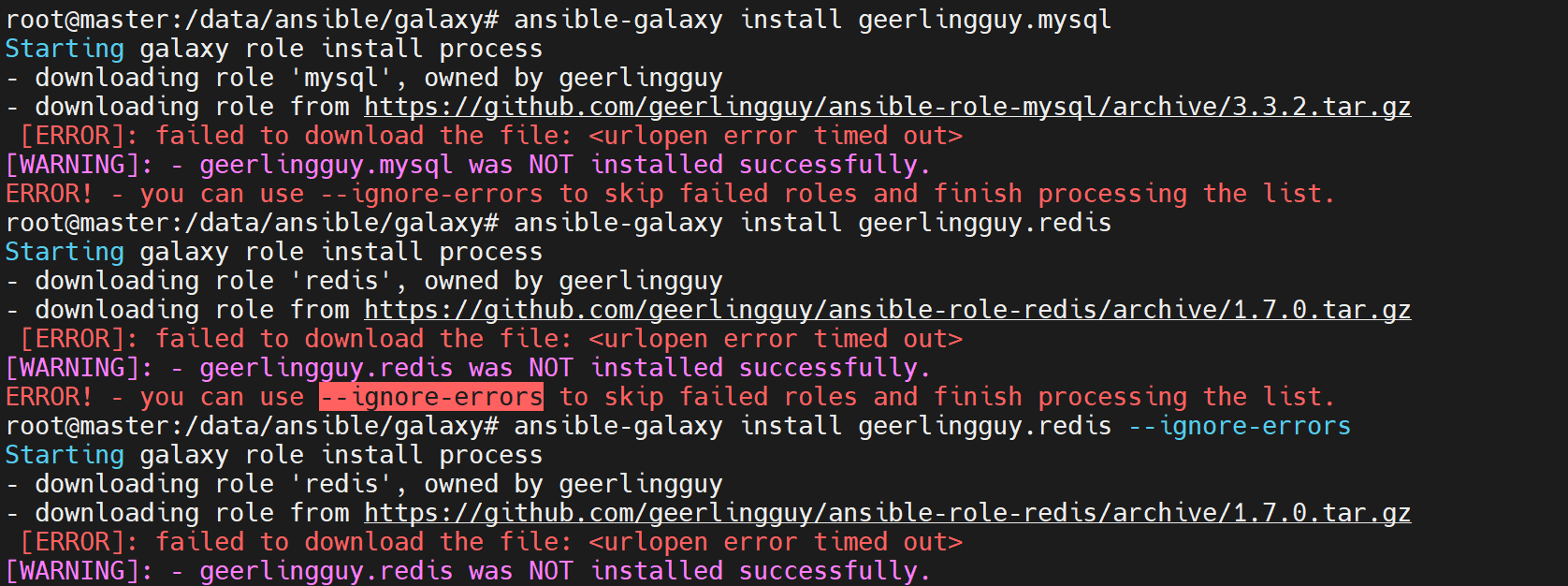
出现超时应核对连通性、代理和源状态,并采用可验证的下载方案,不能把“失败是正常的,多试总会成功”作为结论。安装 Role 只是下载内容,不会自动安装 Redis 服务;运行前需要审阅角色及依赖。
ansible-galaxy role list
ls ~/.ansible/roles/
tree ~/.ansible/roles/davidwittman.redis/ -L 1
du -sh ~/.ansible/roles/davidwittman.redis
# /root/.ansible/roles
- davidwittman.redis, 1.2.9
/root/.ansible/roles/davidwittman.redis/
├── defaults
├── Gemfile
├── Gemfile.lock
├── handlers
├── LICENSE
├── meta
├── README.md
├── tasks
├── templates
├── test
└── vars
8 directories, 4 files
328K /root/.ansible/roles/davidwittman.redis
原改名及移除实验,确认所在目录再执行:
cd ~/.ansible/roles/
mv davidwittman.redis david.redis
ansible-galaxy role list
ansible-galaxy role remove david.redis
ansible-galaxy role list
改名后列表为 david.redis, 1.2.9;移除返回 successfully removed david.redis,本地列表重新为空。role remove 删除的是本地安装目录,不等于删除远端 Galaxy 项目。
4.3 ansible-pull
常规控制端集中发起任务属于 push;ansible-pull 在节点上获取 Git 仓库并运行 Playbook,常结合定时任务实现分散拉取。节点需要 Ansible、Git、仓库访问及任务所需依赖;它不是无需安装任何东西的远端执行魔法。
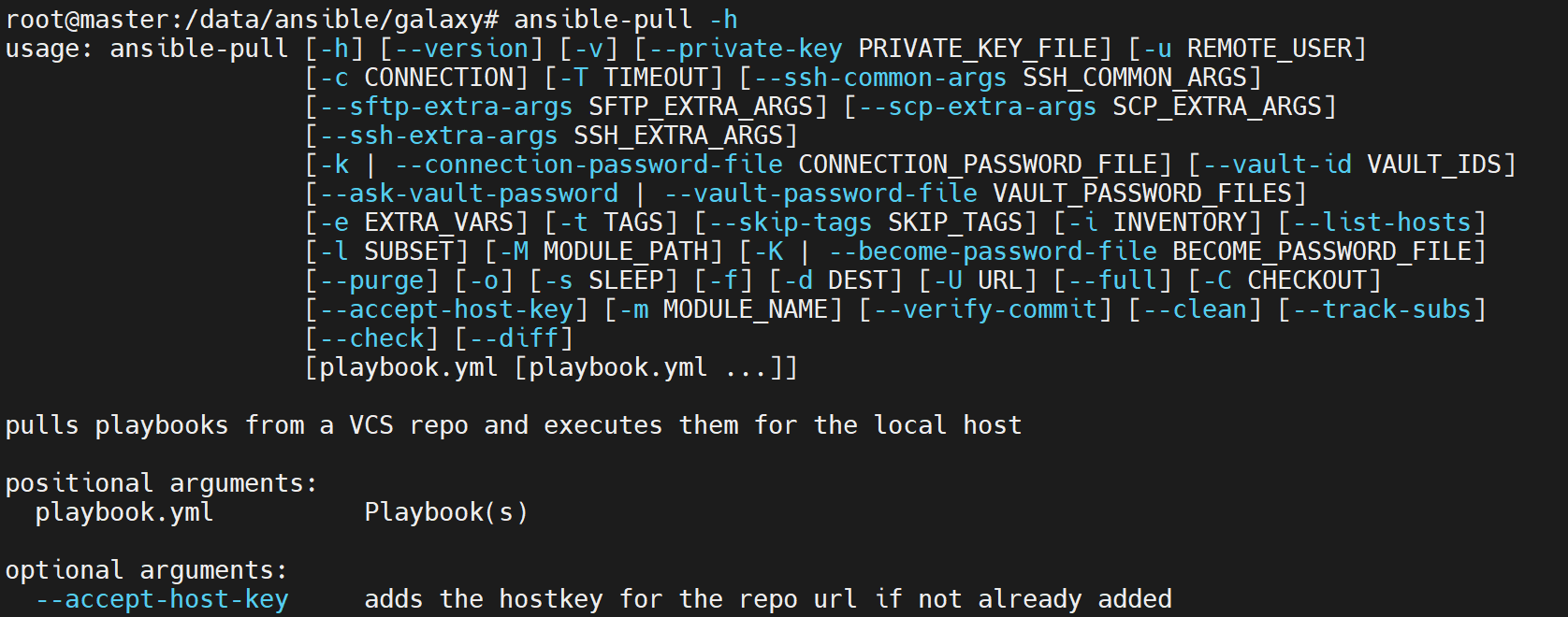
mkdir -p /data/ansible/pull
cd /data/ansible/pull
apt install git
ansible-pull -o -C master -d /tmp/test_pull -i /tmp/test_pull/hosts -U https://gitee.com/wshs1117/kubernetes.git
| 参数 | 含义 |
|---|---|
-U |
Git 仓库 URL。 |
-C |
签出的分支、标签或提交。 |
-d |
本地检出目录。 |
-i |
清单;本例假设仓库中实际有 hosts 文件。 |
-o |
仓库更新时才运行,不是每次都执行。 |
未指定 Playbook 文件时按工具规则寻找主机名对应文件或 local.yml 等;仓库若没有正确文件,拉取成功也不代表部署完成。私有 HTTPS 仓库可以用受支持凭据,SSH URL 则要准备 SSH 身份和主机信任,不是私有仓库只能使用密钥。
原记录:
Starting Ansible Pull at 2024-12-07 22:19:58
[WARNING]: Could not match supplied host pattern, ignoring: ubuntu24-13.ansible.com
[WARNING]: Could not match supplied host pattern, ignoring: ubuntu24-13
localhost | SUCCESS => {
  "after": "108c284a330a82ce1a1f80238e4f54bf5e8b045a",
  "before": "108c284a330a82ce1a1f80238e4f54bf5e8b045a",
  "changed": false,
  "remote_url_changed": false
}
Repository has not changed, quitting.
本次日志表示仓库未更新,因此退出,没有运行配置任务;模式未匹配的警告仍需检查。定时触发应防止本机作业重叠,并为仓库凭据及可执行内容设置合适边界。
4.4 ansible-inventory
查看清单解析结果,--host、--graph、--list 互斥,--export 的导出视图与某些正常处理结果可能不同。
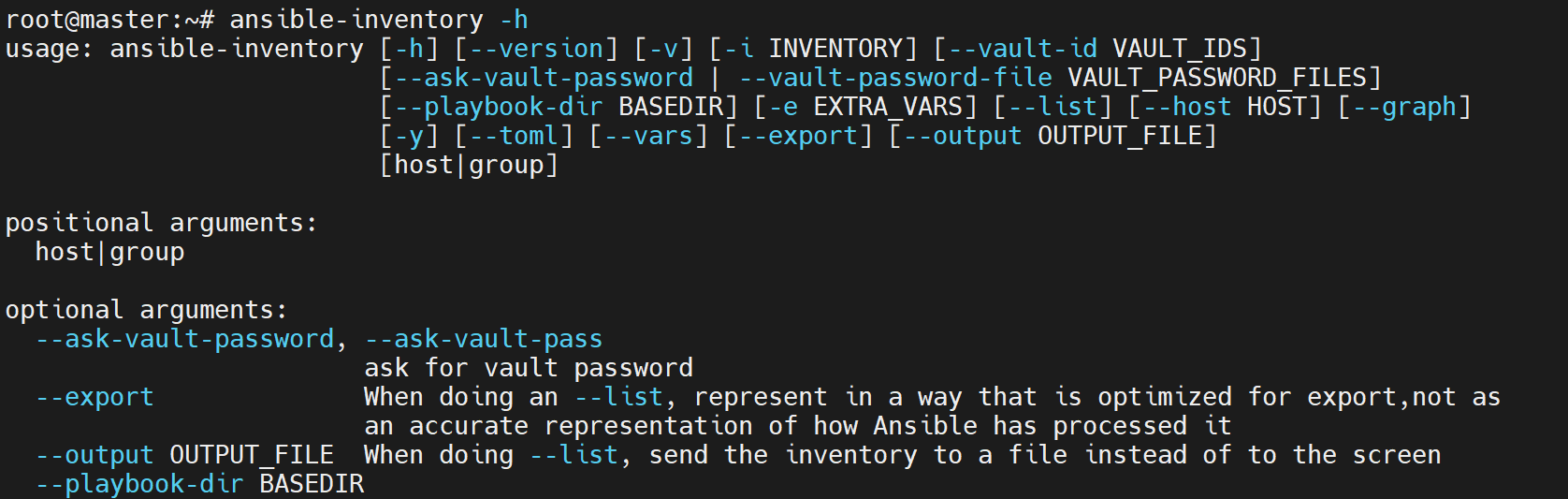
ansible-inventory --export --list
ansible-inventory --export --graph
ansible-inventory --host=10.0.0.16
原列表的结构部分:
_meta:
  hostvars: {}
all:
  children: [ungrouped, web, mysql, storage]
@all:
    |--@ungrouped:
    |--@web:
    |   |--10.0.0.12
    |   |--10.0.0.13
    |--@mysql:
    |   |--10.0.0.13
    |   |--10.0.0.16
    |--@storage:
    |   |--10.0.0.12
    |   |--10.0.0.16
原来的 --host=.16 返回 {},只表示没有可显示的主机变量,不证明该主机不在任何组。应结合 graph 和 inventory_hostname 等上下文判断。
原文加入以下明文变量后演示其展示效果,本稿仅作格式记录,不建议保存密码:
10.0.0.16 ansible_ssh_user=root ansible_ssh_pass=123456 custom_var1=value1 custom_var2=value2
原 --host 返回:
{
  "ansible_ssh_pass": 123456,
  "ansible_ssh_user": "root",
  "custom_var1": "value1",
  "custom_var2": "value2"
}
INI 值的类型解析可能导致纯数字密码变成数值,不能据此认为密码参数应该定义为整数。实际凭据优先使用 SSH 密钥、交互输入或 Vault 等合适方案。
ansible-inventory --vars --graph
ansible-inventory -y --list
变量图中 .16 在 mysql 与 storage 下都显示相同变量;它们是同一主机的视图,不是两台不同主机。原 YAML 输出:
all:
  children:
    mysql:
      hosts:
        10.0.0.13: {}
        10.0.0.16:
          ansible_ssh_pass: 123456
          ansible_ssh_user: root
          custom_var1: value1
          custom_var2: value2
    storage:
      hosts:
        10.0.0.12: {}
        10.0.0.16: {}
    web:
      hosts:
        10.0.0.12: {}
        10.0.0.13: {}
该历史输出不包含本稿清单新增的专用密钥变量;查询完整变量可能包含凭据,展示和存储时应按实际用途处理。
5. Playbook 错误处理与补偿
5.1 block / rescue / always 的实际边界
普通任务失败后,默认停止该主机后续正常任务,其他主机是否继续还受策略、serial、any_errors_fatal 等配置影响。已经完成的任务不会自动撤销。
| 结构 | 作用 |
|---|---|
block |
组织一组任务,并可继承部分条件、标签和提权设置;不是独立功能模块。 |
rescue |
在块中的任务产生可处理失败时执行补偿任务,补偿内容由作者显式编写。 |
always |
在正常及可处理失败路径执行收尾任务;不是任何进程终止、语法错误或不可达场景下都保证运行。 |
这类似 try/catch/finally,但不提供数据库式原子性,也不自动恢复系统快照。无效任务定义、主机不可达等错误不会按普通任务失败进入 rescue;ignore_errors、failed_when 等也会改变失败判断。
成功 rescue 后,Ansible 可以继续后续任务,原失败仍会计入 rescued,命令总体可能成功。若补偿完成后仍要让发布失败,应显式执行 fail。不要把 rescued=1, failed=0 当作部署成功。
Handlers 通常延后执行,不应把其失败指望成此前部署 block 中的普通任务失败。需要在当前块捕获的关键配置检查和 reload,应明确写为块内普通任务;涉及 flush_handlers 的处理须结合版本和实际流程验证。
5.2 原 Nginx 案例的改造目标
原案例包含:创建 nginx-test 用户、站点目录与首页、安装 Nginx、复制主配置、启动服务、备份并更新子配置、重启,以及异常恢复和端口日志。
原 rescue 无条件删除用户和站点、重装 Nginx,再停启服务,不能恢复部署前的用户、内容、配置、版本和启用状态;重装也不保证覆盖被修改过的配置文件。标签过滤还可能让部分回退、always 根本不运行。
本稿将初次安装与子配置变更补偿分开:初次安装失败保留现场并明确失败;更新只备份和恢复本次管理的子配置,不清空已有业务目录。保持 installtask、changetask 标签,使原实验调用方式仍可理解。
5.3 修正后的完整示例
08-playbook-nginx-update.yml 适用于独立 Ubuntu/Debian 实验节点,先用 --limit 10.0.0.16,不能对包含 Rocky 的整组直接运行 APT 安装。控制端当前目录须有本课程配套 nginx.conf 与 nginx-define.conf;主配置需正确包含 /etc/nginx/conf.d/*.conf,并匹配站点及用户。
原 PDF 未在此重新列出主配置,可参照 Ansible 进阶教材中的完整 Role 基础项目 准备文件。本段不是隐藏依赖的一键部署脚本。
- name: Install the teaching service or update its managed subconfiguration
  hosts: web
  remote_user: root
  gather_facts: true
  vars:
    nginx_subconfig: /etc/nginx/conf.d/nginx-define.conf
  pre_tasks:
    - name: Limit this APT example to Debian-family hosts
      ansible.builtin.assert:
        that:
          - ansible_facts['os_family'] == 'Debian'
        fail_msg: 本示例仅用于 Debian/Ubuntu,混合清单必须限制目标。
      tags: always
  tasks:
    - name: Initial installation without destructive pseudo-rollback
      tags: installtask
      block:
        - name: Install Nginx
          ansible.builtin.apt:
            name: nginx
            state: present
            update_cache: true
        - name: Create the dedicated teaching user
          ansible.builtin.user:
            name: nginx-test
            system: true
            shell: /usr/sbin/nologin
        - name: Show the teaching user
          ansible.builtin.command: getent passwd nginx-test
          changed_when: false
        - name: Create the web root
          ansible.builtin.file:
            path: /data/webserver/html
            owner: nginx-test
            state: directory
            mode: '0755'
        - name: Write the teaching index
          ansible.builtin.copy:
            content: '<h1>welcome to ansible</h1>'
            dest: /data/webserver/html/index.html
            owner: nginx-test
            mode: '0644'
        - name: Copy the prepared main configuration with backup
          ansible.builtin.copy:
            src: nginx.conf
            dest: /etc/nginx/nginx.conf
            backup: true
            mode: '0644'
          register: nginx_main_copy
        - name: Validate the main configuration
          ansible.builtin.command: /usr/sbin/nginx -t
          changed_when: false
        - name: Start and enable the teaching service
          ansible.builtin.service:
            name: nginx
            state: started
            enabled: true
      rescue:
        - name: Preserve the failed installation for explicit recovery
          ansible.builtin.fail:
            msg: >-
              初次安装失败,保留现场;没有删除用户或站点,也没有声称原子回滚。
              主配置备份为 {{ (nginx_main_copy | default({})).get('backup_file', '未生成') }}。

    - name: Inspect the subconfiguration before this change
      ansible.builtin.stat:
        path: '{{ nginx_subconfig }}'
        follow: false
      register: nginx_before
      tags: [installtask, changetask]
    - name: Require an ordinary file or an absent path
      ansible.builtin.assert:
        that:
          - not nginx_before.stat.exists or nginx_before.stat.isreg | default(false)
        fail_msg: 本示例不覆盖目录或符号链接,请先确认配置管理范围。
      tags: [installtask, changetask]
    - name: Record the service state
      ansible.builtin.service_facts: {}
      tags: [installtask, changetask]
    - name: Require an installed service
      ansible.builtin.assert:
        that:
          - "'nginx.service' in ansible_facts.services"
        fail_msg: changetask 要求先完成基础安装。
      tags: [installtask, changetask]
    - name: Record whether the service was running
      ansible.builtin.set_fact:
        nginx_was_running: "{{ ansible_facts.services['nginx.service']['state'] == 'running' }}"
      tags: [installtask, changetask]
    - name: Allocate a unique backup for an existing managed file
      ansible.builtin.tempfile:
        state: file
        prefix: nginx-subconfig-before-
      register: nginx_backup
      when: nginx_before.stat.exists
      tags: [installtask, changetask]
    - name: Save the exact previous managed file
      ansible.builtin.copy:
        src: '{{ nginx_subconfig }}'
        dest: '{{ nginx_backup.path }}'
        remote_src: true
        mode: preserve
      when: nginx_before.stat.exists
      tags: [installtask, changetask]

    - name: Update only the managed subconfiguration
      tags: [installtask, changetask]
      block:
        - name: Publish the candidate subconfiguration
          ansible.builtin.copy:
            src: nginx-define.conf
            dest: '{{ nginx_subconfig }}'
            mode: '0644'
          register: nginx_candidate
        - name: Validate the complete configuration before reload
          ansible.builtin.command: /usr/sbin/nginx -t
          changed_when: false
        - name: Reload an originally running service when content changed
          ansible.builtin.service:
            name: nginx
            state: reloaded
          when:
            - nginx_was_running | bool
            - nginx_candidate.changed or (nginx_main_copy | default({})).get('changed', false)
      rescue:
        - name: Restore the previous managed configuration
          ansible.builtin.copy:
            src: '{{ nginx_backup.path }}'
            dest: '{{ nginx_subconfig }}'
            remote_src: true
            mode: '{{ nginx_before.stat.mode }}'
            owner: '{{ nginx_before.stat.uid }}'
            group: '{{ nginx_before.stat.gid }}'
          when: nginx_before.stat.exists
        - name: Remove only the newly introduced configuration
          ansible.builtin.file:
            path: '{{ nginx_subconfig }}'
            state: absent
          when: not nginx_before.stat.exists
        - name: Validate the restored configuration
          ansible.builtin.command: /usr/sbin/nginx -t
          changed_when: false
        - name: Recover a service that was originally running
          ansible.builtin.service:
            name: nginx
            state: restarted
          when: nginx_was_running | bool
        - name: Keep the deployment result failed after compensation
          ansible.builtin.fail:
            msg: 子配置更新失败,已完成上述补偿;部署未成功,备份保留供核对。
      always:
        - name: Collect the final listening state
          ansible.builtin.command: ss -tln
          register: nginx_listeners
          changed_when: false
          failed_when: false
        - name: Record diagnostic output and its return code
          ansible.builtin.copy:
            dest: /tmp/nginx-deploy-status.log
            mode: '0600'
            content: >-
              {{ {'rc': nginx_listeners.rc | default(-1),
                  'stdout': nginx_listeners.stdout | default(''),
                  'stderr': nginx_listeners.stderr | default(''),
                  'msg': nginx_listeners.msg | default('')} | to_nice_json }}
        - name: Show audit paths without claiming deployment success
          ansible.builtin.debug:
            msg:
              - 端口诊断见 /tmp/nginx-deploy-status.log,需结合任务结果和业务检查判断。
              - "原有子配置备份: {{ (nginx_backup | default({})).get('path', '原路径不存在,无旧文件') }}"
备份保留在目标 /tmp,仅用于本次补偿,不替代正式配置版本管理与异地备份。若恢复本身失败,后续任务不保证完成,必须检查失败日志;always 也不是跨主机全局回滚。
备份发生在覆盖前,若备份失败则停止,不继续替换。这里去掉原 Play 级的 host-tags,让隐式 Facts 采集正常保留 always 行为,避免只选 installtask/changetask 时未采集 os_family 就先做断言。重载条件同时检查本次主配置和子配置是否改变,避免已有服务仅更新主配置时没有应用变更。服务原本停止时只检查配置,不擅自启动;初次安装会按 installtask 启动。回退覆盖文件只恢复本示例记录的内容与基本权限,不承诺 ACL、SELinux 上下文或外部资源全部恢复。
5.4 正常与异常实验
先准备有效文件:
server {
    listen 10097;
    root /data/webserver/html;
    location / {
    }
}
ansible-playbook -l 10.0.0.16 --tags installtask 08-playbook-nginx-update.yml
原文故意破坏后的 nginx-define.conf:
server {
    listen 10097
    root /data/webserver/html;
    location / {
    }
}
缺少 listen 行分号。原课件直接 restart 才发现错误:
ansible-playbook -l 10.0.0.16 --tags changetask 08-playbook-nginx-update.yml
原始运行记录:
TASK [copy subconfig前备份原有配置]
changed: [10.0.0.16]
TASK [copy subconfig]
changed: [10.0.0.16]
TASK [restart nginx service]
[ERROR]: Task failed: Module failed: Unable to restart service nginx:
Job for nginx.service failed because the control process exited with error code.
See "systemctl status nginx.service" and "journalctl -xeu nginx.service" for details.
Origin: /root/nginx/08-playbook-nginx-update.yml:37:11
fatal: [10.0.0.16]: FAILED!
TASK [部署异常:回滚清理环境]
ok: [10.0.0.16] => {"msg": "===== Nginx子配置更新失败,执行自动回滚 ====="}
TASK [恢复变更前的子配置]
changed: [10.0.0.16]
TASK [删除备份文件]
changed: [10.0.0.16]
TASK [start nginx after rollback]
changed: [10.0.0.16]
PLAY RECAP
10.0.0.16 : ok=6 changed=5 unreachable=0 failed=0 skipped=0 rescued=1 ignored=0
该 recap 属于原方案,不能套在修正后的 Playbook 上。修正后应在 reload 前由 nginx -t 失败,恢复旧配置或删除新增文件,再显式返回部署失败;原来正在运行的服务不会因为先执行坏配置 restart 而被主动停掉。这里是流程预期,未执行远程实验。
5.5 使用要点
- 对需要处理的失败写清楚检测、补偿与最终失败传播,不用 ignore_errors 掩盖关键问题。
- 明确每一步修改的资源及原始状态,避免无条件删除已存在用户、目录或其他应用配置。
- 校验候选配置再重载,完整应用配置有 include 时不能只验证一个孤立 server 文件。
- 标签会过滤块内任务,补偿和审计也要覆盖实际运行路径;更改标签后重新审阅故障路径。
- 多主机补偿、软件升级、数据库迁移和跨系统事务需要各自设计,block 不提供自动的全局原子性。
6. Role 进阶实践
本章各组原始结果来自不同的实验阶段及清理后的目标状态。复制或还原控制端项目不会清理被控节点;when 跳过不撤销既有配置,改用新配置文件名也不会删除旧文件。为复现单阶段结果,应使用可重建的独立实验基线,或先备份并仅迁移本课程管理的旧配置;保留旧文件连续运行时,预期同时保留其监听端口,不套用下面的历史端口列表。
6.1 角色调用与参数
Role 不是名为 roles 的功能模块;Play 的 roles 关键字组织角色调用。列表可以用标准 role 字段或简写:
- hosts: websrvs
  remote_user: root
  roles:
    - role: mysql
    - memcached
    - nginx
这些角色目录必须已经安装或存在于角色路径。需要参数时传入映射:
- hosts: web
  remote_user: root
  roles:
    - role: role_nginx
      nginx_port: 8888
流式写法等价:
- hosts: web
  remote_user: root
  roles:
    - {role: role_nginx, nginx_port: 8888}
角色参数的优先级与变量来源有关,不等于所有变量都简单全局共享;覆盖策略需结合该版本变量优先级。
6.2 将子配置改为模板
以下延续前述进阶教材已建好的 /data/ansible/role/nginx_pro 基础项目,不是空目录直接执行的完整仓库。先备份:
cd /data/ansible/role
cp -a nginx_pro nginx_pro-base
cd nginx_pro/roles/role_nginx
mkdir -p templates
cp files/nginx-define.conf templates/nginx-define.conf.j2
旧项目可能把静态配置放在 nginx_conf,按其真实路径复制,不要把不存在的目录当作固定约定。模板端口行改为:
server {
    listen {{ nginx_port }};
    root /data/webserver/html;
    location / {
    }
}
roles/role_nginx/tasks/configs.yaml 中更新子配置任务:
- name: Render the managed subconfiguration
  ansible.builtin.template:
    src: nginx-define.conf.j2
    dest: /etc/nginx/conf.d/nginx-define.conf
    mode: '0644'
这里在 Role 的 templates 路径内查找源,不需要重复硬编码 templates/ 前缀。原来的主配置和目录初始化任务继续保留;基础角色还要有配置校验、启动或重载动作,不是 template 自己自动重载服务。
nginx_role.yaml 使用上一节 nginx_port: 8888,检查和执行:
cd /data/ansible/role/nginx_pro
ansible-playbook nginx_role.yaml -C
ansible-playbook nginx_role.yaml
ansible web -m ansible.builtin.shell -a "grep 'listen' /etc/nginx/conf.d/nginx-define.conf"
ansible web -m ansible.builtin.shell -a 'ss -tlnp | grep nginx'
ansible web -m ansible.builtin.command -a 'curl -s localhost:8888'
-C 为检查模式,部分模块或任务不能完整预测依赖和运行结果,不能将其等同于完整部署测试。混合系统组要由基础 Role 处理对应包管理器或使用专用清单。
6.3 按条件调用角色
可对静态角色调用附加 when,条件通常继承到角色任务,并在各任务执行时求值;条件依赖的 Facts 需先收集。
原概述写“IP 是 .14”,实际条件与输出按主机名 top-node 判断,统一按后者解释。
ansible web -m ansible.builtin.setup -a 'filter=ansible_hostname'
原该轮实验清单为 .13/.16/.19,不是最初三节点清单:
10.0.0.16: ansible_hostname = top-node
10.0.0.13: ansible_hostname = top-node1
10.0.0.19: ansible_hostname = top-node
- hosts: web
  remote_user: root
  gather_facts: true
  roles:
    - role: role_nginx
      nginx_port: 10086
      when: ansible_facts['hostname'] == 'top-node'
cd /data/ansible/role/nginx_pro
ansible-playbook nginx_role.yaml -C
ansible-playbook nginx_role.yaml
原监听查询结果:
10.0.0.13 | FAILED | rc=1 >>
non-zero return code
10.0.0.19 | CHANGED | rc=0 >>
tcp 0 0 0.0.0.0:10086 0.0.0.0:* LISTEN 21981/nginx: master
10.0.0.16 | CHANGED | rc=0 >>
tcp 0 0 0.0.0.0:10086 0.0.0.0:* LISTEN 22054/nginx: master
.13 不满足条件,该次原实验在其已无 Nginx 监听的前提下,查询没有匹配而返回 1;这不是角色部署到该节点后失败。如果连续执行上一节而保留 8888 部署,when 跳过不会删除它,查询仍可能找到旧端口,不能预言必定无匹配。条件字符串可以包含合法标点,例如 top-node 的连字符;并非只能由数字和字母构成。
6.4 按标签选择角色
原文称“基于 when 管理标签”,这里实际使用 tags。备份并复制第二个角色:
cd /data/ansible/role
cp -a nginx_pro nginx_pro_when
cp -a nginx_pro_when/roles/role_nginx nginx_pro/roles/role_nginx1
cd nginx_pro
确保各备份目标未存在;同名目录存在时 cp -a 可能形成非预期嵌套。
第一个角色将子配置按端口保存,避免覆盖同一个文件:
- name: Render the port-specific subconfiguration
  ansible.builtin.template:
    src: nginx-define.conf.j2
    dest: '/etc/nginx/conf.d/nginx-{{ nginx_port }}.conf'
    mode: '0644'
两个角色示例:
- hosts: web
  remote_user: root
  roles:
    - {role: role_nginx, nginx_port: 200, tags: [nginx, web]}
    - {role: role_nginx1, nginx_port: 100, tags: [nginx1, web]}
role_nginx1 是复制修改前的角色,原实验仍写 nginx-define.conf,所以两个目录的任务并不完全相同。要统一文件命名,应同时修改两个角色。
cd /data/ansible/role/nginx_pro
ansible-playbook -C -t nginx nginx_role.yaml -l 10.0.0.16
ansible-playbook -t nginx nginx_role.yaml -l 10.0.0.16
ansible 10.0.0.16 -a 'ls /etc/nginx/conf.d'
ansible 10.0.0.16 -m ansible.builtin.shell -a 'ss -tlnp | grep nginx'
ansible-playbook -C -t nginx1 nginx_role.yaml -l 10.0.0.19
ansible-playbook -t nginx1 nginx_role.yaml -l 10.0.0.19
ansible 10.0.0.19 -a 'ls /etc/nginx/conf.d'
ansible 10.0.0.19 -m ansible.builtin.shell -a 'ss -tlnp | grep nginx'
原结果:
10.0.0.16: nginx-200.conf
          0.0.0.0:200 LISTEN 23165/nginx: master
10.0.0.19: nginx-define.conf
          0.0.0.0:100 LISTEN 23119/nginx: master
这说明标签可控制角色选择;不说明两个同名服务实例被自动隔离。100/200 为原实验低端口,绑定权限和服务主进程用户需符合目标配置。
6.5 变量、Handlers 与模板循环整合
6.5.1 准备与目录
本节在已保存的基础角色上继续,不对已有共享业务主机执行整机清理。下面只还原控制端项目;被控端若仍有 nginx-define.conf、nginx-200.conf 等旧实验文件,新建 ansible_nodename.conf 后它们仍会生效。要复现只监听 81/82/83 的单阶段输出,先在专用基线上确认没有这些旧管理配置;保留它们时应把额外端口纳入预期。备份当前项目,再恢复基础副本:
cd /data/ansible/role
mv nginx_pro nginx_pro-tags
cp -a nginx_pro_when nginx_pro
cd nginx_pro
mkdir -p roles/role_nginx/vars roles/role_nginx/handlers
为保留原课件中的改造过程,下面仍展示 vars 文件;希望用户可覆盖的默认值通常更适合 defaults。Role vars 并非只能放常量,合法 Jinja 表达式也可使用,只需理解求值时机和变量优先级。
roles/role_nginx/vars/main.yaml:
server_name: ansible_nodename
pre_name: 'www.'
tail_name: '.com'
这里 server_name 的值是字面字符串 ansible_nodename,用于配置文件基本名,不是实际读取主机 Facts。若希望按真实节点名命名,可改用 "{{ ansible_facts['nodename'] }}" 等明确表达式,并核对最终路径。
6.5.2 Handlers
roles/role_nginx/handlers/main.yaml:
- name: validate nginx
  ansible.builtin.command: /usr/sbin/nginx -t
  changed_when: false
  listen: apply nginx configuration

- name: reload nginx
  ansible.builtin.service:
    name: nginx
    state: reloaded
  listen: apply nginx configuration
两者按照定义顺序响应同一个通知,先检查再重载;校验失败不应继续重载。服务需由基础安装任务启动,初始依赖和失败恢复按前文设计。
roles/role_nginx/tasks/configs.yaml 中的子配置任务:
- name: Render the virtual host configuration
  ansible.builtin.template:
    src: nginx-define.conf.j2
    dest: '/etc/nginx/conf.d/{{ server_name }}.conf'
    mode: '0644'
  notify: apply nginx configuration
Role 的 handlers/main.yaml 会自动加载。不要在 tasks/main.yaml 使用 include_tasks 导入 handlers 文件,否则任务会像普通任务立即执行,破坏“只在变更时通知”的机制。原文这条 include 已移除。
基础 configs.yaml 中的主配置 copy 也要通知同一个主题,不能只给子模板添加 notify;否则仅主配置变化时,后面的 started 不会重载已运行的服务。替换原有主配置复制任务,例如:
- name: Copy the main configuration and notify on change
  ansible.builtin.copy:
    src: nginx.conf
    dest: /etc/nginx/nginx.conf
    backup: true
    mode: '0644'
  notify: apply nginx configuration
主任务文件继续按依赖调用原基础文件,例如:
- name: Run the existing group preparation tasks
  ansible.builtin.include_tasks: groups.yaml
- name: Run the existing user preparation tasks
  ansible.builtin.include_tasks: users.yaml
- name: Run the existing package preparation tasks
  ansible.builtin.include_tasks: packages.yaml
- name: Run the existing configuration tasks
  ansible.builtin.include_tasks: configs.yaml
- name: Run the existing service preparation tasks
  ansible.builtin.include_tasks: services.yaml
这些文件沿用链接中已有基础项目。将基础 services.yaml 的无条件 restart 改成下面的校验与 started,避免每次运行都重启,让重载由变更通知负责:
- name: Validate the assembled configuration
  ansible.builtin.command: /usr/sbin/nginx -t
  changed_when: false
- name: Ensure the service is started and enabled
  ansible.builtin.service:
    name: nginx
    state: started
    enabled: true
文件名以现有项目为准。若基线主任务还调用了其他合法步骤,应保留,不要直接覆盖丢失它们。配置校验放在初次启动之前;通知到正常 Handler 执行点时再校验及重载。
6.5.3 循环模板
roles/role_nginx/templates/nginx-define.conf.j2:
{% for vhost in nginx_vhosts %}
server {
    listen {{ vhost.port }};
    server_name {{ pre_name }}{{ vhost.name }}{{ tail_name }};
    root /data/webserver/html;
    location / {
    }
}
{% endfor %}
原模板允许 port 不存在就不写 listen,可能隐式使用默认端口并造成冲突。这里要求每项明确提供 port/name,与下面清单一致。
nginx_role.yaml:
- hosts: web
  remote_user: root
  vars:
    nginx_vhosts:
      - port: 81
        name: a
      - port: 82
        name: b
      - port: 83
        name: c
  roles:
    - role: role_nginx
原列表写成 - vhost1: {port: 81, name: a} 一类额外嵌套结构,却使用 vhost.port 读取,层级不匹配。这里改成包含 port/name 的扁平字典列表;不保留无法生成声称结果的写法。
6.5.4 测试与原结果
ansible-playbook nginx_role.yaml -C
ansible-playbook nginx_role.yaml
ansible web -m ansible.builtin.shell -a 'ss -tlnp | grep nginx'
ansible web -a 'ls /etc/nginx/conf.d'
ansible web -a 'grep server_name /etc/nginx/conf.d/ansible_nodename.conf'
原课件监听输出:
10.0.0.16 | CHANGED | rc=0 >>
tcp 0 0 0.0.0.0:83 0.0.0.0:* LISTEN 24643/nginx: master
tcp 0 0 0.0.0.0:82 0.0.0.0:* LISTEN 24643/nginx: master
tcp 0 0 0.0.0.0:81 0.0.0.0:* LISTEN 24643/nginx: master
10.0.0.19 | CHANGED | rc=0 >>
tcp 0 0 0.0.0.0:81 0.0.0.0:* LISTEN 24847/nginx: master
tcp 0 0 0.0.0.0:83 0.0.0.0:* LISTEN 24847/nginx: master
tcp 0 0 0.0.0.0:82 0.0.0.0:* LISTEN 24847/nginx: master
10.0.0.13 | CHANGED | rc=0 >>
tcp 0 0 0.0.0.0:81 0.0.0.0:* LISTEN 37167/nginx: master
tcp 0 0 0.0.0.0:82 0.0.0.0:* LISTEN 37167/nginx: master
tcp 0 0 0.0.0.0:83 0.0.0.0:* LISTEN 37167/nginx: master
各节点的原文件名均为 ansible_nodename.conf,与字面变量值一致。每个文件内原输出:
server_name www.a.com;
server_name www.b.com;
server_name www.c.com;
这里三行来自三个不同 server 段,不是同一个 server 重复声明。示例域名仅沿用课件,实际业务应使用有权管理的域名。
6.6 实验清理
原课件在多个阶段清空 /etc/nginx/conf.d、站点目录并删除测试账号。这只适用于可以整体销毁的专用实验环境;不能对承载其他业务的目标原样执行。
以下是确认目标为专用实验节点、数据已无保留需要时的阶段性操作示例,仅列原实验管理的配置,不清空整个 conf.d:
ansible 10.0.0.16 -m ansible.builtin.service -a 'name=nginx state=stopped'
ansible 10.0.0.16 -m ansible.builtin.file -a 'path=/etc/nginx/conf.d/nginx-define.conf state=absent'
ansible 10.0.0.16 -m ansible.builtin.file -a 'path=/etc/nginx/conf.d/nginx-200.conf state=absent'
ansible 10.0.0.16 -m ansible.builtin.file -a 'path=/etc/nginx/conf.d/ansible_nodename.conf state=absent'
ansible 10.0.0.16 -m ansible.builtin.apt -a 'name=nginx state=absent purge=true autoremove=true'
ansible 10.0.0.16 -m ansible.builtin.file -a 'path=/data/webserver/html state=absent'
ansible 10.0.0.16 -m ansible.builtin.user -a 'name=nginx-test state=absent'
其他实验节点及端口特定文件按清单分别处理;卸载 nginx 主包不保证全部子包都已删除,应核对实际包及配置状态。不要删除仍被现存配置引用的用户,也不要将本节“清理”称为恢复部署前状态。
评论